2.14. Known Issues
This page records known defects and issues that are being tracked, grouped by release version.
2.14.1. Known Issues in 2026.10
2.14.1.1. Generate gprof Tool Has No Response
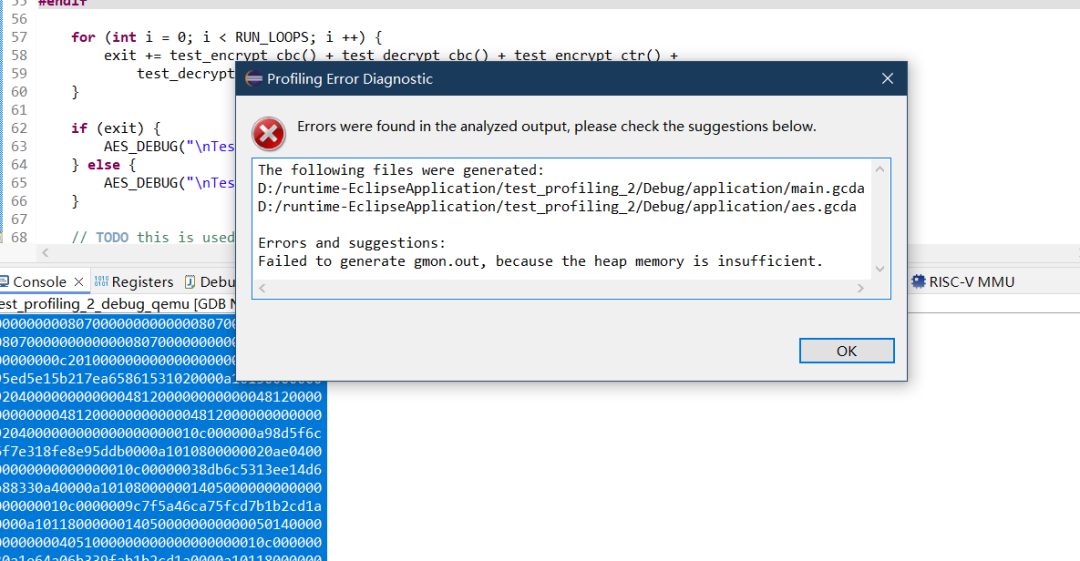
When the Generate gprof tool appears to produce no response, the usual cause is insufficient heap memory on the target: -pg (gprof) and -coverage (gcov) both allocate memory at runtime, so enabling them together may exhaust the heap. In this case the target only prints errors such as monstartup: out of memory or gprof_collect: unable to malloc enough memory to store gprof data, and gmon.out is never generated.
Therefore, test gprof and gcov separately: build and run with -pg alone for gprof, and with -coverage alone for gcov, instead of enabling both at the same time.
Nuclei Studio 2026.10 also improves the error feedback of profiling. Errors found in the analyzed output are captured and shown in a Profiling Error Diagnostic dialog together with suggestions. The dialog is titled Profiling Error Diagnostic, and its body begins with Errors were found in the analyzed output, please check the suggestions below. (or ...no files have been generated. when no output file was produced).
The diagnostic recognizes the following errors (each is a concise, de-duplicated message):
Heap memory insufficient (gmon.out) —
Failed to generate gmon.out, because the heap memory is insufficient.Matched frommonstartup: out of memoryorgprof_collect: unable to malloc enough memory to store gprof data.Heap memory insufficient (.gcda file) —
Failed to generate <file>, because the heap memory is insufficient.Matched fromCan't allocate gcda buffer for <file>.Call-arc table overflow —
gmon.out may be incomplete, because the call-arc table overflowed (tos overflow); some call relations were lost.Matched frommcount: tos overflowor_mcleanup: tos overflow. This message is shown only when no heap error is present; when a heap error occurs, the overflow is treated as a cascade of the heap error and is suppressed.File open failure —
Failed to generate <file>, because the file could not be opened on the target (check semihosting / file system).Matched fromUnable to open <file>. If the same file already reports a heap error, this message is suppressed to avoid contradictory prompts for that file.
2.14.1.2. Linker Script Selected via File System Displayed as Non-existent
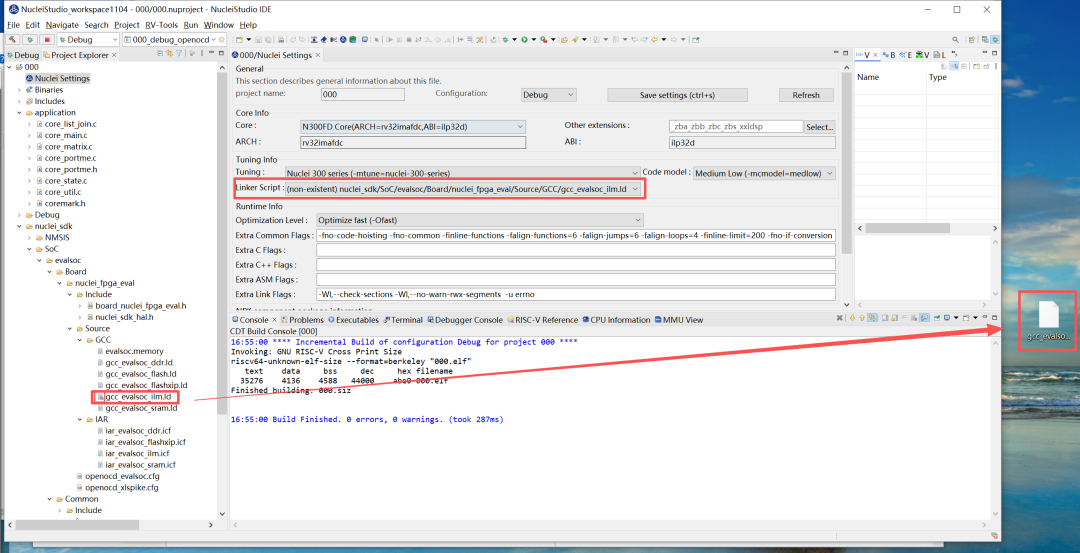
In Nuclei Studio 2026.10, an issue was fixed where a linker script (.ld) selected through File System was incorrectly displayed as non-existent in Nuclei Settings.
The root cause is that Nuclei Settings resolves the selected .ld file as a regular file. If the selected file is a linked file, or the path contains linked folders, the file cannot be located and is therefore reported as non-existent. The same applies to virtual files and folders.
As shown in the figure below, the icon in Project Explorer indicates that gcc_evalsoc_ilm.ld is a linked file, yet the Linker Script field still reports it as non-existent.