2.4. Nuclei Studio NPK Overview
Nuclei RISC-V embedded software development introduces the concept of the Nuclei Package (NPK), inspired by npm package management. Packages make it easy for developers to develop, use, and distribute well-designed software components, greatly speeding up software iteration.
A package consists of the following files:
Package description file (based on YAML):
npk.ymlPackage-related code and documentation
A package is distributed as a ZIP file. Before a package can be imported and used, the IDE or other tools must verify its integrity and usability.
Note
We provide an open-source NPK package checking tool; see https://github.com/Nuclei-Software/npk-checker
The best reference projects for NPK packages are Nuclei SDK and the other packages available online (search for the npk.yml file): https://www.rvmcu.com/nucleistudio-npk.html
A package signing mechanism will be provided in the future: packages will be signed before release, and the signature will be verified when a package is imported, so that only packages published with a legitimate identity are imported and untrusted packages are rejected.
2.4.1. Package Description File (npk.yml)
Packages are divided into the following major types:
csp: Core Support Package, e.g. NMSIS
ssp: SoC Support Package, e.g. the SoC support package for the gd32vf103
bsp: Board Support Package, e.g. the board-level support package for the rvstar development board
osp: RTOS Support Package, e.g. various RTOS support packages
app: Application Package, e.g. various high-level applications
mwp: Middleware Package, e.g. third-party middleware such as speech recognition and algorithm libraries
sdk: Software Development Kit, a predefined software development package that generally contains CSP, SSP, BSP, and APP packages, and optionally OSP and MWP packages
bdp: Bundle Package, a group of packages; currently only valid for app
The following special types are used for tool packages and template packages:
tool: Tool Package, e.g. various tool component packages, which may contain other files that need to be referenced
tpp: Template Package, a template type used to create template projects for csp/ssp/bsp/osp/app/mwp/sdk. This type is special: its description file is named npk_template.yml
2.4.1.1. Common Description File Definitions
The following example shows a package description file with detailed annotations:
## Package Base Information
name: your_package_name # <MUST> Package name ID, no spaces, must follow C naming conventions, English name, unique name ID, used for dependency management
# Naming rules for name: unique, all English, no special characters
# csp type package: csp-xxxx
# ssp type package: ssp-xxxx
# bsp type package: bsp-xxxx
# osp type package: osp-xxxx
# app type package: app-xxxx
# mwp type package: mwp-xxxx
# sdk type package: sdk-xxxx
# tpp type package: tpp-xxxx
# tool type package: tool-xxxx
description: Brief package description # <MUST> Describe the main features and functionality of the package in one sentence, English only, within 20 characters
details: Detailed package description # <MUST> Clearly describe the main features and functionality of the package, English only
version: 1.2.3 # <OPTIONAL> Optional; if not set, defaults to empty. SEMVER 2.0 versioning is recommended, must start with a digit, e.g. 1.2.3
# <MUST> A version tag is mandatory for sdk type packages
type: ssp # <MUST> Package type; available types are csp, ssp, bsp, osp, app, mwp, sdk, tpp, tool
os: win64 # <MUST> OS type, e.g. win32, win64, lin64, lin32; however, the package upload page currently only supports win64 and lin64. This field only exists in tool type packages
category: # <OPTIONAL> Package category, a secondary classification based on the package types above, mainly used to classify packages
keywords: # <MUST> Package keywords, mainly used for indexing and searching
- soc
- risc-v
- nuclei
license: Apache-2.0 # <OPTIONAL> The license used by the package code; available options include GPL, GPLv2, MIT, Apache License v2, BSP, etc.
owner: nuclei # <MUST> The owner of the package, used for permission matching later
# After integration with the website, users must first register a unique owner name before publishing a new package,
# then apply for a package name. A new package with that name can only be published if the name is available; the number of packages a single user can publish is also limited.
contributors: # <OPTIONAL> List of code contributors of the package
- author_name, author_email
homepage: # <OPTIONAL> Homepage of the package, if any; must be a link
## Package Information
packinfo: # <MUST> Only for bsp/ssp type, optional for other types. Used to describe SoC-level information
core_vendor: Nuclei # <MUST> only for ssp, the English name of the processor core vendor. If the core is based on a Nuclei processor core, fill in Nuclei
vendor: Nuclei # <MUST> For ssp/bsp, <OPTIONAL> for others
# For ssp, the English name of the SoC or chip vendor; fill in the corresponding vendor name, e.g. GigaDevice
# For bsp, the English name of the board provider
# For others, OPTIONAL, the provider of this package
name: demosoc # <MUST> The name here serves a different purpose than the package name; it is used to display the specific package name
# For ssp, the specific English name of the SoC in this package; it can be a series name, e.g. GD32VF103
# For bsp, the name of the board
# For others, the display name of this package, Chinese or English; if not set, the root-level name field is used by default
doc: # <OPTIONAL>, if not set, this is empty and not displayed
website: # <OPTIONAL>, the website corresponding to the package
sch: # <OPTIONAL> only for bsp, the circuit schematic of the board
datasheet: # <OPTIONAL>, package datasheet, local path or URL
usermanual: # <OPTIONAL>, Package User Manual
extra: # <OPTIONAL>, additional materials, in list form (URI + DESCRIPTION)
- uri: # <OPTIONAL>, file path or web link
description: # <MUST> when uri is defined, description for file
## Package Dependency
dependencies: # <OPTIONAL> List the dependent packages in the form owner/name:version
- name: csp-nsdk_nmsis # <MUST> when defined # 1. For sdk type packages, there is an implicit dependency: they depend on exactly one bsp type package,
owner: nuclei # <OPTIONAL> if not defined, it will use the owner definition above. Used to depend on a package of a specific owner, in the form owner/name:version; the package is ultimately looked up this way
version: # <OPTIONAL> when defined empty, use default as version number # and all npk.yml files under the current path are automatically found and included as part of the sdk package
# 2. For packages other than sdk type, if they are not placed under the directory of an sdk package but depend on
# an sdk, the dependency must be declared explicitly
# 3. A bsp type package always depends on one ssp type package
# 4. Dependencies can also carry a version number, and version condition matching is supported. If no version is specified, packages without a version are preferred, then the latest package
# See https://docs.platformio.org/en/latest/librarymanager/config.html#version
# https://docs.npmjs.com/about-semantic-versioning
# 1.2.3 - an exact version number. Use only this exact version
# ^1.2.3 - any compatible version (exact version for 1.x.x versions
# ~1.2.3 - any version with the same major and minor versions, and an equal or greater patch version
# >1.2.3 - any version greater than 1.2.3. >=, <, and <= are also possible
# >0.1.0,!=0.2.0,<0.3.0 - any version greater than 0.1.0, not equal to 0.2.0 and less than 0.3.0
# e.g. version: master, version: 1.2.3, version: >0.1.0
# Dependency handling rules
# 1. sdk and app type packages can depend on multiple ssp and bsp type packages, but ultimately only the packages selected in the project wizard are used
# 2. app/bsp/ssp/csp/osp/mwp type packages can depend on sdk; if a package depends on an sdk type package, it means the package belongs to that sdk
# 3. A bsp type package can only depend on one ssp/csp type package; an ssp type package can only depend on one csp type package
# 4. An sdk type package can depend on multiple app/bsp/ssp/csp/osp/mwp types, but this dependency only establishes a membership relationship, indicating that the sdk contains these packages
# 5. An sdk type package cannot depend on another sdk package, but app/bsp/ssp/csp/osp/mwp packages can depend on multiple sdk type packages
## Package Configurations
configuration: # <OPTIONAL> Options for package configuration, used for Project Wizard creation and internal parameter settings
# The sdk type does not currently support configuration parameter definitions
# Configurations defined in configuration can override each other
# The override rule is app > mwp > osp > bsp > ssp > csp
nuclei_core: # <OPTIONAL> A configuration option of type choice
default: n307fd # <MUST> If this configuration is defined, for the choice type, the default value must be one of the choices listed below
type: choice # <MUST> Configuration type; available options are choice, list, checkbox, multicheckbox, text
global: true # <OPTIONAL> Can be true or false, defaults to true
description: Nuclei RISC-V Core # <MUST> Description of this configuration item, within 20 characters
choices: # <MUST> When the configuration item type == choice
- name: n201 # <MUST> Each item must contain name and description
arch: rv32iac # <OPTIONAL> Only used to indicate the ARCH information of the RISC-V CORE; not recommended for arbitrary use
abi: ilp32 # <OPTIONAL> Only used to indicate the ABI information of the RISC-V CORE; not recommended for arbitrary use
tune: # <OPTIONAL> Only used to indicate the TUNE information of the RISC-V CORE; not recommended for arbitrary use
info: # <OPTIONAL> Used to access custom key-value data, e.g. ${nuclei_core.info.key1} returns value1
- name: key1 # <MUST> key in pair with value, string type, must not contain any spaces
value: value1 # <MUST> value in pair with key, string type
- name: key2 # <MUST>
value: value2 # <MUST>
description: N201 Core(ARCH=rv32iac, ABI=ilp32) # <MUST> Describes the specific meaning of this item
# Besides name and description, other items may be defined with arbitrary names
# For example, arch and abi are defined here
- name: n201e # Another item
arch: rv32eac
abi: ilp32e
description: N201E Core(ARCH=rv32eac, ABI=ilp32e)
extra_flags: # <OPTIONAL> A configuration option, this one is of type text
value: # <MUST>, only accepts English strings
description: Extra compiler flags # <MUST> Description of this configuration item, within 30 characters
dsp_present: # <OPTIONAL> A configuration option, this one is of type checkbox
default: 0 # <MUST>, defaults to 0, can be 0 or 1
type: checkbox # <MUST>, configuration type, checkbox here
global: true # <OPTIONAL> Can be true or false, defaults to true
description: P-Extension(DSP) Present # <MUST> Description of this configuration item, within 30 characters
libraries: # <OPTIONAL> A configuration option, this one is of type multicheckbox
default: [dsp, nn] # <MUST> Default value, a combination from choices
type: multicheckbox # <MUST>, configuration type, multicheckbox here
global: true # <OPTIONAL> Can be true or false, defaults to true
description: Libraries Used # <MUST> Description of this configuration item, within 30 characters
choices: # <MUST> When the configuration item type == multicheckbox
- name: dsp # <MUST> Each item must contain name and description
description: DSP Library # <MUST> Describes the specific meaning of this item
# Besides name and description, other items may be defined with arbitrary names
- name: nn
description: NN Library
- name: ai
description: AI Library
## Source Code Management
codemanage: # <MUST> This is mandatory
installdir: demosoc # <MUST> The directory name where the code should be installed, English only, must follow C naming format
# For sdk type packages, installed to <sdk_installdir>; if installdir is not defined, it defaults to SDK; if no sdk type package is referenced, sdk_installdir is also set to SDK by default
# For csp type packages, installed to <sdk_installdir>/<csp_installdir>, TBD
# For ssp type packages, installed under <sdk_installdir>/SoC/<ssp_installdir>/Common
# For bsp type packages, installed under <sdk_installdir>/SoC/<ssp_installdir>/Board/<bsp_installdir>; if it does not depend on any ssp type, installed to <sdk_installdir>/BSP/<bsp_installdir>
# For osp type packages, installed under <sdk_installdir>/OS/<osp_installdir>
# For app type packages, installed under <app_installdir>/; if installdir is not defined, it defaults to application
# For mwp type packages, installed to <sdk_installdir>/Components/<mwp_installdir>
copyfiles: # <MUST> Files or folders to be copied, glob pattern matching supported; refers to all directories or files
- path: ["Source/", "Include/", "demosoc.svd"] # <MUST> List of paths of files or folders to be copied, glob pattern matching supported
- path: ["DSP_Source", "DSP_Include"]
condition: $( ${dsp_present} == 1 ) # <OPTIONAL> The "if" here is a fixed identifier; if present, a condition check is performed as follows
# For example, dsp_present is defined in configuration, and its value is determined by the wizard or other selected packages
incdirs: # <OPTIONAL> List of header file directories to be added
- path: ["Include/"] # <OPTIONAL> Directories of header files to be added
libdirs: # <OPTIONAL> Optional directories where lib libraries are located
- path:
ldlibs: # <OPTIONAL> Optional libraries to be linked
- libs:
## Set Configuration for other packages
setconfig: # <OPTIONAL> Used to set options of other packages
# The following options follow the override rule: app > mwp > osp > bsp > ssp > csp
- config: nmsislibarch
value : ${nuclei_core.arch}p # <OPTIONAL> Directly set options in Configuration
condition: $( ${dsp_present} == 1 ) # <OPTIONAL> Determine whether to set the nmsislibarch value based on dsp_present here
- config: nmsislibarch
value: ${nuclei_core.arch}
condition: $( ${dsp_present} == 0 )
## Build Configuration
buildconfig: # <OPTIONAL> Configuration of build options
# Currently, build options from all packages are concatenated or overridden
# The following options are overridden: app > mwp > osp > bsp > ssp > csp
# type is a special field used to identify a specific compiler; gcc is currently supported
# cross_prefix, prebuild_steps, postbuild_steps, description
# The remaining options are concatenated
- type: gcc # <OPTIONAL> Currently only gcc; other interfaces are reserved
description: Nuclei GNU Toolchain # <MUST> For ssp
cross_prefix: riscv-nuclei-elf- # <OPTIONAL> If not set or left empty, the toolchain provided by the system is used automatically
common_flags: # <OPTIONAL> Common build options, which will be added to cflags, asmflags, and cxxflags
- flags: -g -fno-common -ffunction-sections -fdata-sections
- flags: -march=${nuclei_core.arch} -mabi=${nuclei_core.abi} -mcmodel=medany
ldflags: # <OPTIONAL> List of linker options; empty means no options
- flags: -nostartfiles --specs=nosys.specs
- flags: --specs=nano.specs
condition: $(${newlib} != "normal")
- flags: -u _printf_float
condition: $(${newlib} != "nano_with_printfloat")
- flags: -u _isatty -u _write -u _sbrk -u _read -u _close -u _fstat -u _lseek
linkscript: # <MUST> Definition of the link script, must be defined in bsp/ssp
- script: "Source/GCC/gcc_demosoc_${.download}.ld"
condition: $(check pattern) # <OPTIONAL> Perform a conditional check
cflags: # <OPTIONAL> C build options; empty means no options
- flags: -O3
asmflags: # <OPTIONAL> ASM build options; empty means no options
- flags: -O2
cxxflags: # <OPTIONAL> CXX build options; empty means no options
- flags: -O1
common_defines: # <OPTIONAL> Common macro definitions
- defines: __RISCV_FEATURE_DSP=1
condition: $(${dsp_present} == 1)
- defines: DOWNLOAD_MODE_STRING=\"flashxip\"
cdefines: # <OPTIONAL> C macro definitions
- defines: __RISCV_FEATURE_DSP=1
condition: $(${dsp_present} == 1)
- defines: DOWNLOAD_MODE_STRING=\"flashxip\"
asmdefines: # <OPTIONAL> ASM macro definitions
- defines: __RISCV_FEATURE_DSP=1
condition: $(${dsp_present} == 1)
- defines: DOWNLOAD_MODE_STRING=\"flashxip\"
cxxdefines: # <OPTIONAL> CXX macro definitions
- defines: __RISCV_FEATURE_DSP=1
condition: $(${dsp_present} == 1)
- defines: DOWNLOAD_MODE_STRING=\"flashxip\"
prebuild_steps: # <OPTIONAL> Commands executed before build
command: # <OPTIONAL> The command line to execute
description: # <OPTIONAL> Description of the executed command
postbuild_steps: # <OPTIONAL> Commands executed after the build completes
command: # <OPTIONAL> The command line to execute
description: # <OPTIONAL> Description of the executed command
## Debug Configuration
debugconfig: # <MUST> For bsp type, optional for app/ssp type
# Currently, debug options from all packages are concatenated or overridden
# type is a special field used to describe a specific debugger; openocd and qemu are currently supported
# The following fields are overridden: app > mwp > osp > bsp > ssp > csp
# description, svd
# The key-value pairs under the configs field are merged: if the corresponding key exists, it is overridden (following the same override rule); otherwise it is merged
- type: openocd # <MUST> The selected tool
description: Nuclei OpenOCD # <MUST> For bsp type
svd: gd32vf103.svd # <OPTIONAL> Optional SVD file
configs:
- key: config # openocd configuration file
value: "openocd_gd32vf103.cfg"
- type: qemu
description: Nuclei QEMU
svd:
configs:
- key: nuclei_core # Nuclei RISC-V Core
value: ${nuclei_core}
condition: # condition set nuclei_core key
- key: download_mode # Download mode
value: ${download_mode}
- key: riscv_arch # RISCV ARCH
value: ${nuclei_core.arch}
- key: riscv_abi # RISCV ABI
value: ${nuclei_core.abi}
- key: machine # QEMU Machine
value: gd32vf103v_rvstar
## Extended Sections
## Only works on tool type
## Each package has a package path, referenced as npk name-version, e.g. ${tool-cmlink-1.0.0};
## other variables are referenced as npk name-version-variable name, e.g. ${tool-cmlink-1.0.0-proxy}
environment: # Extended variables
- key: proxy # Variable name
value: bin/cmlink_gdbserver.exe # The actual resolved result is the npk file's parent path + value, e.g. C:\Users\jj\nuclei-pack-npk\NPKs\XinShengTech\Tool_Package\tool-cmlink\1.0.0\cmlink\bin\cmlink_gdbserver.exe
description: proxy location
system: true # Defaults to false; when system is true, the variable is referenced directly by its name, e.g. ${proxy}
## Template File Management
## Only works on tpp type. This type is special; its description file is npk_template.yml, which is an extension of npk.yml
templatemanage:
installdir: ${soc}
files:
build.mk.ftl: build.mk
Common/npk.yml.ftl: Common/npk.yml
Common/demosoc.svd.ftl: Common/${soc}.svd
Common/Source/demosoc_common.c: Common/Source/${soc}_common.c
Common/Source/system_demosoc.c.ftl: Common/Source/system_${soc}.c
Common/Source/Drivers/demosoc_uart.c.ftl: Common/Source/Drivers/${soc}_uart.c
Common/Source/GCC/intexc_demosoc.S.ftl: Common/Source/GCC/intexc_${soc}.S
Common/Source/GCC/startup_demosoc.S.ftl: Common/Source/GCC/startup_${soc}.S
Common/Source/Stubs: Common/Source/Stubs
Common/Include/demosoc.h.ftl: Common/Include/${soc}.h
Common/Include/demosoc_uart.h.ftl: Common/Include/${soc}_uart.h
Common/Include/nuclei_sdk_soc.h.ftl: Common/Include/nuclei_sdk_soc.h
Common/Include/system_demosoc.h.ftl: Common/Include/system_${soc}.h
Board/nuclei_fpga_eval/openocd_demosoc.cfg: Board/${board}/openocd_${soc}.cfg
Board/nuclei_fpga_eval/npk.yml.ftl: Board/${board}/npk.yml
Board/nuclei_fpga_eval/Source/GCC/gcc_demosoc_ilm.ld.ftl.ftl: Board/${board}/Source/GCC/gcc_${soc}_ilm.ld
Board/nuclei_fpga_eval/Source/GCC/gcc_demosoc_flash.ld.ftl: Board/${board}/Source/GCC/gcc_${soc}_flash.ld
Board/nuclei_fpga_eval/Source/GCC/gcc_demosoc_flashxip.ld.ftl: Board/${board}/Source/GCC/gcc_${soc}_flashxip.ld
Board/nuclei_fpga_eval/Include/board_nuclei_fpga_eval.h.ftl: Board/${board}/Include/board_${board}.h
Board/nuclei_fpga_eval/Include/nuclei_sdk_hal.h.ftl: Board/${board}/Include/nuclei_sdk_hal.h
2.4.1.2. Content Conventions
To keep the npk.yml file readable and simple, the following conventions apply to how it is written:
Field order should be consistent with the template; data and DICT entries are saved in the order they are read
Add comments to fields, especially where explanation is needed
Fields marked MUST are checked against the rules described in the comments above; if a field does not comply, an error is reported and the package is not imported
Use 2 space characters for indentation
OPTIONAL fields can be left empty or omitted entirely
Add one blank line between first-level fields; do not use blank lines for second-level and lower fields; do not use blank lines between first-level fields in the first part (base information)
Do not use quotation marks for strings, except where special syntax requires them
Keep all
descriptionfields within 20 characters, English only, for layout and display purposesFor the conventions on multi-line strings in YAML, see: https://yaml-multiline.info/
2.4.1.3. Package Import Rules
The package import rules are defined below:
- If the package being imported depends on other packages (with version matching) that have not been imported, the import is rejected, and the user is prompted that dependent packages are missing and must be imported first.
Once package management goes online in the future, the user can be prompted to download the dependent packages from the network or to import ZIP packages manually
- If a package being deleted is depended on by other packages, the user is shown which packages depend on it and asked whether to delete it; after deletion, the missing packages are shown in package management
Once package management goes online in the future, downloading missing packages with one click will be supported, or ZIP packages can be imported manually
If a package of the same version is imported, the user is informed that the package already exists and asked whether to replace it
If a package of a different version is imported, the user is informed that another version of the package already exists and asked whether to continue with the import
Imported packages are displayed grouped by their defined type, showing the package version, name, owner, description, homepage, and license
2.4.1.4. ZIP Package Content Rules
The content rules for a ZIP package are defined below:
A ZIP package must contain at least one NPK file
- Package type determination: if a package contains NPK files of multiple types, the package type is determined as follows
sdk > ssp > bsp > osp > mwp > csp > app
If multiple NPKs of the determined package type exist, the package is invalid, the import is rejected, and the user is prompted
A package of a given type must not contain multiple NPK files of that type
For an
sdktype package, it must contain at least onessppackage, onebsppackage that depends on thatssp, and at least oneapptype package; packages of other types are allowedFor packages of other types, any other NPKs they contain must explicitly depend on that package
2.4.1.5. Package Dependency Handling
Package dependency handling defines how packages can be split and organized into sensible dependency relationships so that packages can be maintained independently. The dependency rules for each package type are described in detail below.
Dependencies are declared in the dependency list under the dependencies field, which supports depending on a package with a specific name and version from a specific owner. The lookup rule is owner/name:version; if owner is not defined, it defaults to the owner defined in the npk file; if version is not defined, the package is first looked up within the same package bundle, otherwise the latest package is used.
2.4.1.5.1. csp Core Support Package Dependencies
A csp type package is a software package that supports processor cores (CORE). For Nuclei RISC-V cores, the recommended csp is the open-source NMSIS software support package.
A csp type package is a very low-level package, and it must not depend on packages of types such as ssp/bsp/mwp/rtos/app. However, it can depend on sdk type packages, which means the package belongs to the environment of the sdk package it depends on.
2.4.1.5.2. ssp SoC Support Package Dependencies
An ssp type package is a software package that supports an SoC or chip, such as the SoC support packages for gd32vf103 and demosoc.
An ssp software package can only depend on packages of types csp/mwp/osp. Such a dependency means that the code of these packages is imported when the project is created or when code is introduced. If it depends on an sdk type package, it means the ssp type package belongs to the environment of the sdk type package it depends on.
In theory, a user can create an ssp software package that does not depend on any csp/mwp/rtos package and does not belong to any sdk type package. It can depend on at most one osp type package.
2.4.1.5.3. bsp Board Support Package Dependencies
A bsp type package is a software support package released for a development board based on a specific SoC or chip, such as the bsp software package for the gd32vf103-rvstar development board.
A bsp software package can only depend on packages of types ssp/csp/mwp/osp. Such a dependency means that the code of these packages is imported when the project is created or when code is introduced. If it depends on an sdk type package, it means the bsp type package belongs to the environment of the sdk type package it depends on.
In theory, a user can create a bsp software package that does not depend on any package. It can depend on at most one osp type package.
2.4.1.5.4. osp OS Support Package Dependencies
An osp type package is a software support package for a specific RTOS, such as freertos or ucosii.
An osp type package can only depend on packages of types ssp/csp/mwp. Such a dependency means that the code of these packages is imported when the project is created or when code is introduced. If it depends on an sdk type package, it means the osp type package belongs to the environment of the sdk type package it depends on.
2.4.1.5.5. mwp Middleware Support Package Dependencies
An mwp type package is a middleware software package, such as a speech algorithm library or an IoT connectivity library like mqtt or coap.
An mwp type package can only depend on packages of types bsp/ssp/csp/mwp/osp, but depending directly on bsp/ssp is not recommended. When creating middleware, keep it generic so that it can be easily integrated into other software.
2.4.1.5.6. sdk Software Development Kit Package Dependencies
An sdk type package is a special kind of software package. It contains no code of its own; instead, it is composed entirely of dependencies on other package types. When an sdk type package is imported, all npk.yml files under the package directory are scanned for other packages, which are included in the SDK dependency without having to declare the dependency explicitly. This dependency relationship does not directly cause code to be imported when a project is created; an sdk type package is essentially a collection of packages.
An sdk type package may depend on multiple ssp, multiple bsp, multiple csp, multiple app, multiple mwp, and multiple osp packages. For more details, see Building an SDK Development Package.
When resolving the dependencies of packages that belong to an sdk type package, packages inside the same sdk package are preferred. For example:
sdk-nuclei-sdk is an sdk type package that internally contains the packages csp-nsdk_nmsis, bsp-nsdk_nuclei_fpga_eval, ssp-nsdk_demosoc, ssp-nsdk_gd32vf103, osp-nsdk_freertos, and osp-nsdk_ucosii
External versions of packages such as csp-nsdk_nmsis and osp-nsdk_freertos also exist. During project creation, the internal csp-nsdk_nmsis and osp-nsdk_freertos are preferred as long as version matching is satisfied; the external ones are used only when the version matching requirements are not met
After the project is created, users can manually upgrade a specific package to another version.
2.4.2. Section Overview
As the example above shows, a standard npk.yml file consists of several major blocks, though not all of them are used in practice. A compliant npk.yml file works in Nuclei Studio as long as it contains the basic information.
2.4.2.1. Package Base Information
This block contains the basic information of the NPK; most of the key information must be described clearly here. The key fields are described below.
name
Mandatory. The name ID of the NPK. No spaces; must follow C naming conventions; English name; a unique name ID.
version
Optional. If not set, defaults to empty. SEMVER 2.0 versioning is recommended; must start with a digit, e.g. 1.2.3
type
Mandatory. Available type values are csp, ssp, bsp, osp, app, mwp, sdk, tpp, tool
os
Optional. Indicates which variant of Nuclei Studio the NPK applies to. The Nuclei Studio releases currently distributed come in win64 and lin64 versions. The OS type can be win32, win64, lin64, or lin32, but the package upload page currently only supports win64 and lin64. This field only exists in tool type packages
owner
Mandatory. The owner of the package. This ID is generally an authenticated developer ID, used for permission matching later. If the NPK is only for local testing, any value is acceptable.
2.4.2.1.1. Package Information
The packinfo block provides descriptive information about the NPK, including documentation and other materials. When the NPK is used in Nuclei Studio, this information is displayed in the New Project wizard.
2.4.2.1.2. Package Dependency
dependencies describes the dependency relationships of the NPK. To enable NPK reuse and reduce maintenance costs, an NPK can declare dependencies: an NPK can depend on zero or more NPKs. The dependencies field therefore appears as a group of objects, and each dependency object must specify the name, owner, and version of the NPK.
2.4.2.2. Package Configurations
The Configuration field is a special field, mainly used to provide configurable items that support interactive scenarios during project creation.
The second-level field names under the configuration field can be identical across different packages; identical names carry identical meanings. If the same name is defined more than once, the following override rule applies.
The override rule is: app > mwp > osp > bsp > ssp > csp
The Configuration object group contains multiple objects, each with a fixed structure.
XXX (variable name)
The variable name is arbitrary as long as it follows C++ naming conventions. It is referenced elsewhere in the form ${XXX} or ${XXX.XX}.
default
Default value, optional.
type
The type of this variable. To support a richer UI experience, NPK defines many UI component types; see the following chapters for details.
global
Indicates whether this field is displayed on the wizard page during project creation.
tips
Descriptive information about this variable, mainly used for UI tips events.
hints
Descriptive information about this variable, such as value examples, mainly used for UI hints events.
description
The description of this variable in the NPK.
UI component information
Supported types include choice, list, checkbox, multicheckbox, text, etc.; see below for details
2.4.2.3. Source Code Management
codemanage describes content related to the template project. An NPK often includes many complex features, but only some of its files are needed when a specific project is created, and those files must be configured. codemanage describes this information; it contains the following keywords:
custom
Defaults to false. When true, this installdir indicates the directory to install directly into
srcroot
Defaults to ., which means the directory where the current npk.yml is located; it can be a relative path, e.g. ../, ../bsp, etc. Note that once this is set, the root directories of the corresponding copyfiles/incdirs/libdirs paths are all affected and use the newly set path
installdir
The directory name where the code should be installed, English only, must follow C naming format
For sdk type packages, installed to
<sdk_installdir>; if installdir is not defined, it defaults to SDK; if no sdk type package is referenced, sdk_installdir is also set to SDK by defaultFor csp type packages, installed to
<sdk_installdir>/<csp_installdir>, TBDFor ssp type packages, installed under
<sdk_installdir>/SoC/<ssp_installdir>/CommonFor bsp type packages, installed under
<sdk_installdir>/SoC/<ssp_installdir>/Board/<bsp_installdir>; if it does not depend on any ssp type, installed to<sdk_installdir>/BSP/<bsp_installdir>For osp type packages, installed under
<sdk_installdir>/OS/<osp_installdir>For app type packages, installed under
<app_installdir>/; if installdir is not defined, it defaults to applicationFor mwp type packages, installed to
<sdk_installdir>/Components/<mwp_installdir>
Note
2023.05.26 Added: copyfiles/incdirs/libdirs all support relative parent directories such as ../../, but when installing or setting paths, they are all placed under <installdir>
For example: path: ["../common/"] copies the common directory from the parent directory and places it under <installdir>/common.
If there is already a common directory below, create R1L_common; for ../../common, create R2L_common.
This scheme is no longer used; same-name directories are created directly, and same-name files are overwritten directly. Use srcroot: .. instead for the corresponding incdirs/libdirs
When such relative paths are encountered, the final installed path and file name prevail
copyfiles
Files or folders to be copied, covering all directories or files; supports ../, *, *.*, and is used together with srcroot.
incdirs
Mandatory. The list of header file directories to be added. Nuclei Studio resolves these paths; the final paths are relative to the project root directory.
libdirs
Optional. The directories where lib libraries are located. Nuclei Studio resolves these paths; the final paths are relative to the project root directory.
ldlibs
Optional libraries to be linked. Nuclei Studio resolves these paths; the final paths are relative to the project root directory.
2.4.2.4. Set Configuration for Other Packages
setconfig is used to set options of other packages in the NPK, following the override rule app > mwp > osp > bsp > ssp > csp.
setconfig is an object group that can be extended indefinitely; each object has three fields.
config
Variable name, following C++ naming conventions. A general variable XXX is referenced elsewhere in the form ${XXX}
The variable name is not unique; it can take effect conditionally through condition checks, and it also follows the override rule app > mwp > osp > bsp > ssp > csp for automatic overriding.
value
The value of the variable
condition
The condition of the variable. The value takes effect only when the condition is met
2.4.2.5. Build Configuration
Configures the build tools and build options of the project. Its keywords include the following fixed fields:
type
The type of build tool supported; values are generally gcc, clang, common. Currently only gcc and clang are supported. Because some build option configurations are identical, the common type was added to improve code reusability.
description
A description of this build tool.
toolchain_name
Important field. The name of the build tool.
cross_prefix
Important field. The prefix of the build tool.
unflags
Takes effect in common_flags/cflags/asmflags/ldflags/cxxflags of the buildconfig section; removes previously defined flags.
undefines
Takes effect in common_defines/cdefines/asmdefines/cxxdefines of the buildconfig section; removes previously defined defines (takes effect on exact string match).
common_flags
Common build options, which will be added to cflags, asmflags, and cxxflags; empty means no options.
ldflags
List of linker options; empty means no options.
linkscript
Definition of the link script, must be defined in bsp/ssp; empty means no options.
cflags
C build options; empty means no options.
asmflags
ASM build options; empty means no options.
cxxflags
CXX build options; empty means no options.
common_defines
Common macro definitions; empty means no options.
cdefines
C macro definitions; empty means no options.
asmdefines
ASM macro definitions; empty means no options.
cxxdefines
CXX macro definitions; empty means no options.
prebuild_steps
command
Commands executed before build; empty means no options.
description
Description of the commands executed before build; empty means no options.
postbuild_steps
command
Commands executed after build; empty means no options.
description
Description of the commands executed after build; empty means no options.
2.4.2.6. Debug Configuration
Configures the debug type and related parameters of the project. Its keywords include the following fixed fields. This block is optional; if configured, Nuclei Studio generates a launch file from its content when the project is created, so the project can be debugged directly.
type
Debug type. Currently supports GDB Custom, GDB SEGGER J-Link, GDB OpenOCD, GDB Nuclei QEMU, Nuclei RVProf
description
Description of the supported debugger (Custom, J-Link, OpenOCD, QEMU, or RVProf)
configs
The parameters of the corresponding debug type. All parameters appear as key-value pairs. Each debug type requires different parameters; detailed explanations are given below.
debugconfig:
  - type: openocd
    description: Nuclei OpenOCD
    configs:
      - key: XXXX
        value: xxxx
2.4.2.6.1. GDB Custom Debug Arguments
Name |
Reset Value |
Description |
doStartGdbCLient |
true |
Start locally |
doStartGdbServer |
true |
Start GDB session |
gdbClientOtherCommands |
gdb Client Other Commands |
|
gdbClientOtherOptions |
gdb Client Other Options |
|
gdbMode |
Commands |
Supported types: Commands, General, and DLink |
gdbServerConnectionAddress |
gdb Server Connection Address |
|
gdbServerExecutable |
gdb Server Executable |
|
serverCheckFlag |
Started by GNU MCU Eclipse |
server Check Flag |
gdbServerGdbPortNumber |
3333 |
gdb Server Gdb Port Number |
gdbServerOther |
Config options |
|
DEBUG_NAME |
${cross_prefix}gdb${cross_suffix} |
Executable path |
ipAddress |
localhost |
Host name or IP address |
portNumber |
3333 |
|
UPDATE_THREADLIST_ON_SUSPEND |
false |
Force thread list update on suspend |
otherInitCommands |
Initialization Commands |
|
loadImage |
true |
Load executable |
imageFileName |
use File For Image name |
|
imageOffset |
Executable offset (hex) |
|
useFileForImage |
false |
Use file for Image |
useProjBinaryForImage |
true |
|
loadSymbols |
true |
Load symbols |
symbolsFileName |
||
symbolsOffset |
Symbols offset (hex) |
|
useProjBinaryForSymbols |
true |
Use project binary |
useFileForSymbols |
false |
Use file for Symbols |
doDebugInRam |
true |
Debug in RAM |
otherRunCommands |
Run/Restart Commands |
|
setPcRegister |
false |
Set program counter at (hex) |
pcRegister |
||
setResume |
false |
|
setStopAt |
true |
Set breakpoint at |
stopAt |
main |
|
doContinue |
true |
Continue |
svdPath |
svd file path |
2.4.2.6.2. GDB SEGGER J-Link Debug Arguments
Name |
Reset Value |
Description |
arch |
Nuclei ARCH |
|
executable |
OpenOCD Executable Name |
|
tool_extrapreopts |
Additional value, prepended to Config options |
|
tool_extraopts |
Additional value, replacing Config options |
|
tool_extrapostopts |
Additional value, appended to Config options |
|
gdb_extraprecmds |
Additional value, prepended to Commands |
|
gdb_extracmds |
Additional value, replacing Commands |
|
gdb_extrapostcmds |
Additional value, appended to Commands |
|
doStartGdbServer |
true |
Start the J-Link GDB server locally |
doConnectToRunning |
false |
Connect to running target |
gdbServerExecutable |
Executable path |
|
doGdbServerAllocateConsole |
true |
Allocate console for the GDB server |
doGdbServerInitRegs |
true |
do Gdb Server Init Regs |
doGdbServerLocalOnly |
true |
do Gdb Server Local Only |
doGdbServerSilent |
false |
do Gdb Server Silent |
doGdbServerVerifyDownload |
true |
do Gdb Server Verify Download |
doStartGdbServer |
true |
Start the J-Link GDB server locally |
gdbClientOtherCommands |
set mem inaccessible-by-default off |
gdb Client Other Commands |
gdbServerConnection |
usb |
gdb Server Connection |
gdbServerConnectionAddress |
gdb Server Connection Address |
|
gdbServerDebugInterface |
jtag |
gdb Server Debug Interface |
gdbServerDeviceEndianness |
little |
gdb Server Device Endianness |
gdbServerDeviceName |
gdb Server Device Name |
|
gdbServerLog |
gdb Server Log path |
|
gdbServerGdbPortNumber |
2331 |
gdb Server Gdb Port Number |
gdbServerSwoPortNumber |
2332 |
gdb Server SwoPort Number |
gdbServerTelnetPortNumber |
2333 |
gdb Server Telnet PortNumber |
gdbServerOther |
gdb Server Other |
|
DEBUG_NAME |
${cross_prefix}gdb${cross_suffix} |
Executable path |
gdbClientOtherOptions |
gdb Client Other Options |
|
ipAddress |
localhost |
|
portNumber |
2331 |
|
gdbServerDeviceSpeed |
auto |
gdb Server Device Speed |
doFirstReset |
false |
Initial Reset and Halt |
firstResetType |
||
firstResetSpeed |
1000 |
|
enableFlashBreakpoints |
true |
Enable flash breakpoints |
doGdbServerAllocateSemihostingConsole |
true |
Allocate console for semihosting and SWO |
enableSemihosting |
true |
Enable semihosting console routed to |
enableSemihostingIoclientTelnet |
true |
Telnet |
enableSemihostingIoclientGdbClient |
false |
GDB client |
enableSwo |
true |
Enable SWO |
swoEnableTargetCpuFreq |
0 |
SWO Cpu freq |
swoEnableTargetSwoFreq |
0 |
SWO freq |
swoEnableTargetPortMask |
0x1 |
SWO Port mask |
otherInitCommands |
other Init Commands |
|
jtagDevice |
GNU MCU J-Link |
|
loadImage |
true |
Load executable |
imageFileName |
||
imageOffset |
||
useFileForImage |
false |
|
useProjBinaryForImage |
true |
|
loadSymbols |
true |
Load symbols |
symbolsFileName |
||
symbolsOffset |
||
useFileForSymbols |
false |
|
useProjBinaryForSymbols |
true |
|
doDebugInRam |
true |
Debug in RAM |
doSecondReset |
true |
Pre-run/Restart reset |
secondResetType |
Type (always executed at Restart) |
|
otherRunCommands |
||
setPcRegister |
false |
Set program counter |
pcRegister |
Set program counter at (hex) |
|
setStopAt |
true |
Set breakpoint |
stopAt |
main |
Set breakpoint at |
doContinue |
true |
Continue |
svdPath |
svd file path |
2.4.2.6.3. GDB OpenOCD Debug Arguments
Name |
Reset Value |
Description |
arch |
Nuclei ARCH |
|
executable |
OpenOCD Executable Name |
|
tool_extrapreopts |
Additional value, prepended to Config options |
|
tool_extraopts |
Additional value, replacing Config options |
|
tool_extrapostopts |
Additional value, appended to Config options |
|
gdb_extraprecmds |
Additional value, prepended to Commands |
|
gdb_extracmds |
Additional value, replacing Commands |
|
gdb_extrapostcmds |
Additional value, appended to Commands |
|
doStartGdbServer |
true |
Start OpenOCD locally |
gdbServerExecutable |
Executable path |
|
gdbServerGdbPortNumber |
3333 |
GDB port |
gdbServerTelnetPortNumber |
4444 |
Telnet port |
gdbServerTclPortNumber |
6666 |
Tcl port |
gdbClientOtherOptions |
gdb Client Other Options |
|
gdbServerOther |
Config options |
|
doGdbServerAllocateConsole |
true |
do GdbServer Allocate Console |
doGdbServerAllocateTelnetConsole |
false |
do Gdb Server Allocate Telnet Console |
gdbServerConnectionAddress |
gdb Server Connection Address |
|
doStartGdbCLient |
true |
do Start Gdb CLient |
DEBUG_NAME |
${cross_prefix}gdb${cross_suffix} |
|
gdbClientOtherCommands |
Commands |
|
ipAddress |
localhost |
Host name or IP address |
portNumber |
3333 |
Port number |
UPDATE_THREADLIST_ON_SUSPEND |
false |
Force thread list update on suspend |
doFirstReset |
false |
Initial Reset and Halt |
firstResetType |
init |
|
otherInitCommands |
||
enableSemihosting |
false |
Enable semihosting console routed to |
loadImage |
true |
Load executable |
useFileForImage |
false |
|
imageFileName |
||
imageOffset |
||
symbolsFileName |
||
symbolsOffset |
||
loadSymbols |
true |
Load symbols |
useFileForSymbols |
false |
|
useProjBinaryForImage |
true |
|
useProjBinaryForSymbols |
true |
|
useRemoteTarget |
true |
|
doDebugInRam |
true |
Debug in RAM |
doSecondReset |
true |
Pre-run/Restart reset |
secondResetType |
halt |
Type (always executed at Restart) |
otherRunCommands |
||
setPcRegister |
false |
Set program counter |
pcRegister |
Set program counter at (hex) |
|
setStopAt |
true |
Set breakpoint |
stopAt |
main |
Set breakpoint at |
doContinue |
true |
Continue |
svdPath |
svd file path |
2.4.2.6.4. GDB Nuclei QEMU Arguments
Name |
Reset Value |
Description |
nuclei_archext |
Nuclei archext |
|
extra_board |
Nuclei DevelopBoard |
|
extra_cpu |
Nuclei CPU Core |
|
riscv_arch |
Nuclei ARCH |
|
executable |
OpenOCD Executable Name |
|
tool_extrapreopts |
Additional value, prepended to Config options |
|
tool_extraopts |
Additional value, replacing Config options |
|
tool_extrapostopts |
Additional value, appended to Config options |
|
gdb_extraprecmds |
Additional value, prepended to Commands |
|
gdb_extracmds |
Additional value, replacing Commands |
|
gdb_extrapostcmds |
Additional value, appended to Commands |
|
doStartGdbServer |
true |
Start OpenOCD locally |
gdbServerExecutable |
Executable path |
|
gdbMachineBit |
Machine Bit |
|
gdbServerBoardName |
Board name |
|
gdbCoreName |
Nuclei RISC-V Core |
|
gdbServerSMPCount |
1 |
Nuclei SMP Count |
gdbDownloadName |
Download |
|
gdbServerOther |
-serial stdio -nodefaults -S |
More options |
otherExtensions |
other Extensions |
|
gdbServerGdbPortNumber |
1234 |
GDB port |
isGdbServerVerbose |
false |
Extra verbose |
enableSemihosting |
true |
Enable Arm semihosting |
disableGraphics |
true |
Do not open graphic windows |
doGdbServerAllocateConsole |
true |
Allocate console for QEMU |
DEBUG_NAME |
${cross_prefix}gdb${cross_suffix} |
Executable name |
gdbClientOtherOptions |
Other options |
|
gdbClientOtherCommands |
Commands |
|
ipAddress |
localhost |
Host name or IP address |
portNumber |
1234 |
Port number |
doFirstReset |
false |
Initial Reset and Halt |
otherInitCommands |
||
loadSymbols |
true |
Load symbols |
symbolsFileName |
||
symbolsOffset |
||
useFileForSymbols |
false |
|
useProjBinaryForSymbols |
true |
|
useRemoteTarget |
true |
|
loadImage |
true |
Load executable |
useFileForImage |
false |
|
imageFileName |
||
imageOffset |
||
useProjBinaryForImage |
true |
|
doDebugInRam |
false |
Debug in RAM |
otherRunCommands |
||
doSecondReset |
true |
Pre-run/Restart reset |
setPcRegister |
false |
Set program counter |
pcRegister |
Set program counter at (hex) |
|
setStopAt |
true |
Set breakpoint |
stopAt |
main |
Set breakpoint at |
doContinue |
true |
Continue |
svdPath |
SVD file path |
2.4.2.6.5. Nuclei RVProf Arguments
Name |
Reset Value |
Description |
cycleModelExecutable |
${cyclemodel_path}/${cyclemodel_executable} |
cycleModel Executable |
cycleModelExecutableTimeOut |
20 |
cycleModelExecutable TimeOut |
cycleModelExecutableProcessorCores |
4 |
cycleModel Executable Processor Cores |
cycleModelOther |
cycleModel Other |
|
docycleModelAllocateConsole |
true |
|
docycleModelAllocateTelnetConsole |
false |
|
RVProfExecutable |
${rvprof_path}/${rvprof_executable} |
RVProf Executable |
RVProfExecutableTimeOut |
20 |
RVProf Executable TimeOut |
RVProfOther |
RVProf Other |
|
RVProfPortNumber |
5000 |
RVProfPort Number |
doRVProfAllocateConsole |
true |
|
doRVProfAllocateTelnetConsole |
false |
2.4.2.7. Extended Variables
environment is a configuration used in tool type NPK packages. To share a tool (tool type, such as cycleModel) through NPK, use the environment configuration. Once environment is defined, Nuclei Studio automatically generates several global variables, which can be referenced in other NPKs in the form ${xxx-1.0.0-XXX}.
Note
Each package has a package path, referenced as npk name-version, e.g.
${tool-cyclemodel-1.0.0}Other variables are referenced as npk name-version-variable name, e.g.
${tool-cyclemodel-1.0.0-cyclemodel_path},${tool-cyclemodel-1.0.0-cyclemodel_executable}When the system value of a variable is true, an additional variable without a version number is generated (taking the highest version), e.g.
${tool-cyclemodel-cyclemodel_executable}
name: tool-cyclemodel
owner: nuclei
os:
version: 1.0.0
description: Nuclei Tools cyclemodel
details: Nuclei Tools cyclemodel
type: tool
keywords:
  - tool
  - cyclemodel
license: Apache-2.0
homepage:

## Extended variables  tool-cyclemodel-1.0.0 and tool-cyclemodel-1.0.0-proxy
environment:
  - key: cyclemodel_path
    value: bin
    description: cyclemodel path
    system: true
  - key: cyclemodel_executable
    value: bin/n300_best_config_cymodel_latest
    description: cyclemodel executable
    system: true


## This is code from another NPK, demonstrating how to use tool-cyclemodel
debugconfig:
  - type: rvprof
    description: Nuclei RVProf
    configs:
      - key: ncycm_path
        value: ${tool-cyclemodel-1.0.0-cyclemodel_executable}
      - key: rvprof_path
        value: ${tool-rvprof-1.0.0-rvprof_executable}
2.4.2.8. Template File Management
An internally used configuration; not described in detail here.
2.4.3. UI Components in NPK
NPK provides a rich set of UI components. The fields of these components all contain the sub-fields default, description, and global, each with its own meaning.
default indicates the default value, description indicates the meaning of the option, and global indicates whether the option is displayed during project creation (true) or is only used for internal parameter passing (false).
Choice single-selection box
choice_test:
  default_value: ground
  type: choice
  description: choice_test
  choices:
    - name: ground
      description: Ground Rules
      info:
        - name: app_commonflags
          value: >-
            -O3 -flto -fno-inline -funroll-loops -Wno-implicit -mexplicit-relocs
            -fno-builtin-printf -fno-common -falign-functions=4 -falign-jumps=4 -falign-loops=4
    - name: inline
      description: Inline
      info:
        - name: app_commonflags
          value: >-
            -O3 -flto -finline -funroll-loops -Wno-implicit -mexplicit-relocs -fno-builtin-printf
            -fno-common -falign-functions=4 -falign-jumps=4 -falign-loops=4 -finline-functions
    - name: best
      description: Best Effort
      info:
        - name: app_commonflags
          value: >-
            -Ofast -flto -fwhole-program -finline -funroll-loops -Wno-implicit -mexplicit-relocs
            -fno-builtin-printf -fno-common -falign-functions=4 -falign-jumps=4 -falign-loops=4
            -finline-functions

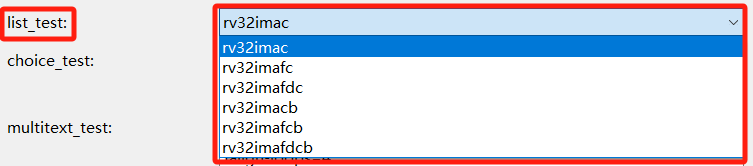
list single-selection box
list_test:
  default_value: rv32imac
  type: list
  global: true
  description: list_test
  value: >-
    [rv32imac,rv32imafc,rv32imafdc,rv32imacb,rv32imafcb,rv32imafdcb]
checkbox single checkbox
checkbox_test:
  default_value: 0
  type: checkbox
  global: true
  description: checkbox_test

multicheckbox shuttle selection box
Two syntax forms are shown below
multicheckbox_old:
  default_value: []
  type: multicheckbox
  global: true
  description: multicheckbox_old
  choices:
    - name: b
      description: Bitmanip Extension
    - name: p
      description: Packed SIMD Extension
    - name: v
      description: Vector Extension

multicheckbox_new:
  default_value: rv32imac
  type: multicheckbox
  global: true
  description: multicheckbox_new
  param:
    name: ["rv32imac","rv32imafc","rv32imafdc"]
    description: ["${name} description","${name} description","${name} description"]

text single-line text box
text_test:
  value: >-
    -O2 -funroll-all-loops -finline-limit=600 -ftree-dominator-opts
    -fno-if-conversion2 -fselective-scheduling -fno-code-hoisting
    -fno-common -funroll-loops -finline-functions -falign-functions=4
    -falign-jumps=4 -falign-loops=4
  type: text
  description: text_test

multitext multi-line text box
multitext_test:
  value: >-
    -O2 -funroll-all-loops -finline-limit=600 -ftree-dominator-opts
    -fno-if-conversion2 -fselective-scheduling -fno-code-hoisting
    -fno-common -funroll-loops -finline-functions -falign-functions=4
    -falign-jumps=4 -falign-loops=4
  type: multitext
  description: multitext_test

multichoice multi-select dropdown
Two syntax forms are shown below
multichoice_test1:
  default_value: []
  type: multichoice
  global: true
  description: multichoice_test1
  param:
    name: ["rv32imac","rv32imafc","rv32imafdc"]
    description: ["${name} description","${name} description","${name} description"]

multichoice_test2:
  default_value: >-
   [rv32imac,rv32imafdc]
  type: multichoice
  global: true
  description: multichoice_test2
  choices:
    - name: rv32imac      #
      description: ${name} description
    - name: rv32imafc
      description: ${name} description
    - name: rv32imafdc
      description: ${name} description

cascaderchoice cascading selection box
cascaderchoice_test:
  default_value: >-
   [hubei,jingzhou,shashi]
  type: cascaderchoice
  global: true
  description: cascaderchoice test
  cascader_param:
    - hubei:
        - wuhan
        - jingzhou:
            - shashi
            - jianli
    - hunan:
        - changsha
        - guangdong

switchbutton switch
switchbutton_test:
  default_value: 0
  type: switchbutton
  global: true
  description: switchbutton test

slider numeric selection box
slider_test:
  default_value: 0
  type: slider
  description: slider_test
  param:
    range: >-
     [0,100,1]

spinner numeric selection box
spinner_test:
  default_value: 10
  type: spinner
  description: spinner_test
  param:
    range: >-
     [-100,100,2]

multispinner multiple numeric selection box
multispinner_test:
  default_value: >-
   [3,4,6,4,6,4,6,4,6,7]
  type: multispinner
  global: true
  description: multispinner_test
  param:
    range: >-
     [-100,100,1],[-100,100,2],[-100,100,3],[-100,100,3],[-100,100,3],[-100,100,3],[-100,100,3],[-100,100,3],[-100,100,3],[-100,100,4]

multicheckbox_v2 multiple-checkbox box
Two syntax forms are shown below
multicheckbox_v2_test1:
default_value: >-
 [rv32imac]
type: multicheckbox_v2
global: true
description: multicheckbox_v2 test1
param:
  name: ["rv32imac","rv32imafc","rv32imafdc"]
  description: ["${name} description","${name} description","${name} description"]

multicheckbox_v2_test2:
  default_value: >-
   [rv32imac]
  type: multicheckbox_v2
  global: true
  description: multicheckbox_v2 test2
  choices:
    - name: rv32imac
      description: rv32imac
    - name: rv32imafc
      description: rv32imafc2
    - name: rv32imafdc
      description: rv32imafdc

multiradio radio box
Two syntax forms are shown below
multiradio_test1:
  default_value: rv32imac
  type: multiradio
  global: true
  description: multiradio test1
  param:
    name: ["rv32imac","rv32imafc","rv32imafdc"]
    description: ["${name} description","${name} description","${name} description"]

multiradio_test2:
  default_value: rv32imac
  type: multiradio
  global: true
  description: multiradio test2
  choices:
    - name: rv32imac
      description: rv32imac
    - name: rv32imafc
      description: rv32imafc2
    - name: rv32imafdc
      description: rv32imafdc

2.4.4. NPK Syntax
2.4.4.1. YAML Language
The NPK description file npk.yml is written in YAML and supports standard YAML syntax. For more information about YAML, see: https://yaml.org/
2.4.4.2. Variable Definitions
The NPK description language allows users to define a custom variable and use it anywhere in NPKs that have a dependency relationship with the defining NPK.
Note
In the example, the NPK defines a variable app_commonflags. In any npk.yml file that has a dependency relationship with this NPK, the value of app_commonflags can be used through
${app_commonflags}.In the example, the NPK defines a list object nuclei_core. In any npk.yml file that has a dependency relationship with this NPK, the arch value of the nuclei_core object can be used through
${nuclei_core.arch}, the abi value through${nuclei_core.abi}, and the tune value through${nuclei_core.tune}.
configuration:
    app_commonflags:
        value:
        type: text
        description: Application Compile Flags

    nuclei_core:
        default_value: n201
        type: choice
        global: true
        description: Nuclei RISC-V Core
        choices:
          - name: n200
            arch: rv32imc
            abi: ilp32
            cmodel: medlow
            tune: nuclei-200-series
            description: N200 Core(ARCH=rv32imc, ABI=ilp32)
          - name: n201
            arch: rv32iac
            abi: ilp32
            cmodel: medlow
            tune: nuclei-200-series
            description: N201 Core(ARCH=rv32iac, ABI=ilp32)
## Set Configuration for other packages
setconfig:
  - config: nmsislibarch
    value: ${nuclei_core.arch}
## Build Configuration
buildconfig:
  - type: gcc
    common_flags: # flags need to be combined together across all packages
      - flags: ${app_commonflags}
2.4.4.3. Keywords
NPK defines a number of fields to describe various relationships. Most of the fields are self-explanatory; the following keywords are highlighted here.
condition
condition is a custom keyword used very frequently in npk.yml to handle logical relationships, similar to if. It is used as follows.
ldflags:
  - flags: --specs=nosys.specs
    condition: $( ${stdclib} == "newlib_full" )
  - flags: --specs=nano.specs --specs=nosys.specs -u _printf_float -u _scanf_float
    condition: $( ${stdclib} == "newlib_fast" )
  - flags: --specs=nano.specs --specs=nosys.specs -u _printf_float
    condition: $( ${stdclib} == "newlib_small" )
  - flags: --specs=nano.specs --specs=nosys.specs
    condition: $( ${stdclib} == "newlib_nano" )
  - flags: --specs=${stdclib}.specs
    condition: $( startswith(${stdclib}, "libncrt") )

# In the above description, the value of flags is determined by condition; in different scenarios, the value of flags will differ.
# And because flags is an array type, flags in the above example will have multiple values; what is ultimately used is the string concatenated from the values of flags.
dependencies
dependencies is used in npk.yml to describe the dependency relationships of an NPK.
In many cases, an NPK needs to depend on a package with a specific name and version from a specific owner. The lookup rule is owner/name:version; if owner is not defined, it defaults to the owner defined in the npk file; if version is not defined, the package is first looked up within the same package bundle, otherwise the latest package is used. If a depended-on package cannot be found, the NPK is unusable.
Note
In the example, the NPK depends on three NPKs, as follows:
For sdk-nuclei_sdk, owner and
versionare not defined, so the package is first looked up within the same package bundle; otherwise the latest package is usedtool-testmodel explicitly specifies owner and version
tool-rvprof explicitly specifies owner and version
## Package Dependency
dependencies:
  - name: sdk-nuclei_sdk
    version:
    owner:
  - name: tool-testmodel
    version: 1.0.0
    owner: nuclei
  - name: tool-rvprof
    version: 1.0.0
    owner: nuclei
2.4.4.4. Custom Functions
To meet various needs, NPK (npk.yml) defines a set of commonly used built-in functions.
upper
Convert a string to uppercase
${linker_script} = "test"
$(upper("${linker_script}CD")) => TESTCD
lower
Convert a string to lowercase
${linker_script} = "test"
$(lower("${linker_script}cd")) => testcd
contains
Determine whether a string contains another string
${linker_script} = "test"
$(contains(${linker_script}, nmsis) ) => false
join
Join a string array into a string
$(join([a,b,c,v], '')) => abcv
concat
Concatenate strings into a new string
${linker_script} = "test"
$(concat(${linker_script}, v)) => testv
strip
Remove whitespace at both ends of a string
${linker_script} = "   test  "
$(strip(${linker_script})) => test
startswith
Determine whether a string starts with the specified prefix
${linker_script} = "testabcd"
$(startswith(${linker_script}, test)) => true
endswith
Determine whether a string ends with the specified suffix
${linker_script} = "testabcd"
$(endswith(${linker_script}, test))  => false
arithop
Arithmetic operator. Supports common operators such as +, -, *, /, %, and ? (ternary operation); does not support ++ or –
$(arithop(${linker_script}+22) > 1000)
$(arithop(${linker_script}+22))
$(arithop(${linker_script}>22?1:0))
npack/npack_installdir
Checks whether npack contains the specified NPK
npack_installdir is the path of the contained NPK
# a.yml
    name: mwp-a
    owner: nuclei
    copyfiles:
        - path: ["common", "abc.ld", "src/openocd.cfg", "inc"]

# b.yml

    name: mwp-b
    owner: nuclei
    copyfiles:
        - path: ["common", "111.ld", "src", "inc"]
    debugconfig:
      - type: openocd
        description: Nuclei OpenOCD
        configs:
          - key: config
            value: "$(npack_installdir(mwp-a))/src/openocd.cfg"
            condition: $( npack(nuclei:mwp-a) )

# This description means: when b.yml depends on a.yml, the value of config can be set to /src/openocd.cfg under the directory of a.yml
list_get
Get the element at the specified index of an array
${nuclei_cache}=[ic,dc,ccm]
$(list_get(${nuclei_cache},0)) -> ic
list_set
Modify the element at the specified index of an array
${nuclei_cache}=[ic,dc,ccm]
$(list_set(${nuclei_cache},1,aa)) -> [ic,aa,ccm]
list_del
Delete the element at the specified index of an array
${nuclei_cache}=[ic,dc,ccm]
$(list_del(${nuclei_cache},1)) -> [ic,ccm]
list_add
Insert a value at the specified index of an array
${nuclei_cache}=[ic,dc,ccm]
$(list_add(${nuclei_cache},2,aa)) -> [ic,dc,aa,ccm]
list_size
Get the length of an array
${nuclei_cache}=[ic,dc,ccm]
$(list_size(${nuclei_cache})) -> 3
list_sub
Extract a sub-list of the specified length starting from the specified position in a list
${nuclei_cache}=[ic,dc,ccm]
$(list_sub(${nuclei_cache},1,2)) -> [dc]
$(list_sub(${nuclei_cache},0,2)) -> [ic,dc]
$(list_sub(${nuclei_cache},1,)) -> [dc,ccm]
$(list_sub(${nuclei_cache},,2)) -> [ic,dc]
subst
Replace a substring inside a string; the third parameter can be empty
subst(libncrt_small,lib,) ==> ncrt_small
subst(libncrt_small,lib,ext) ==> extncrt_small