Updating Nuclei Studio 2023.10 to the Latest Fixed Version
The Nuclei Studio 2023.10 version uploaded on 2023.11.06 had some issues. We have fixed them and replaced the online 2023.10 version at 2023.11.17 13:30.
Problem Description
The Nuclei Studio 2023.10 version released on November 6, 2023 contained some issues that affected the user experience:
- The busybox in build tools had a problem, causing compilation failures when make is used with pre- and post-build steps
- Corner cases in Nuclei Settings may fail in certain scenarios
- The way Nuclei Settings is opened affects how other files in the project are opened
- When using the V extension in QEMU, the RVV length was not passed in
- Fixed an issue where a project with the same name could be created when opening a brand-new workspace and creating a new project; reopening the workspace resolves this problem
We made the following changes to fix the issues above:
- Modified and released Nuclei Studio Plugins 2.1.0, uploaded to the plugin update site
- Modified and released Windows build-tools 1.2, replacing the online Windows Build Tools 2023.10
- Released a new Nuclei Studio 2023.10, replacing the online Nuclei Studio 2023.10
How to Upgrade Nuclei Studio 2023.10 to the Latest Version
If your Nuclei Studio 2023.10 was downloaded before November 18, 2023, the issues described above may affect your user experience. You can either upgrade manually or download our latest release from the official website.
Upgrading Nuclei Studio 2023.10 Downloaded Before November 18, 2023
If you downloaded Nuclei Studio 2023.10 before November 18, 2023, you can update your Nuclei Studio 2023.10 to the latest version in the following ways.
1. Upgrade Nuclei Studio Plugins
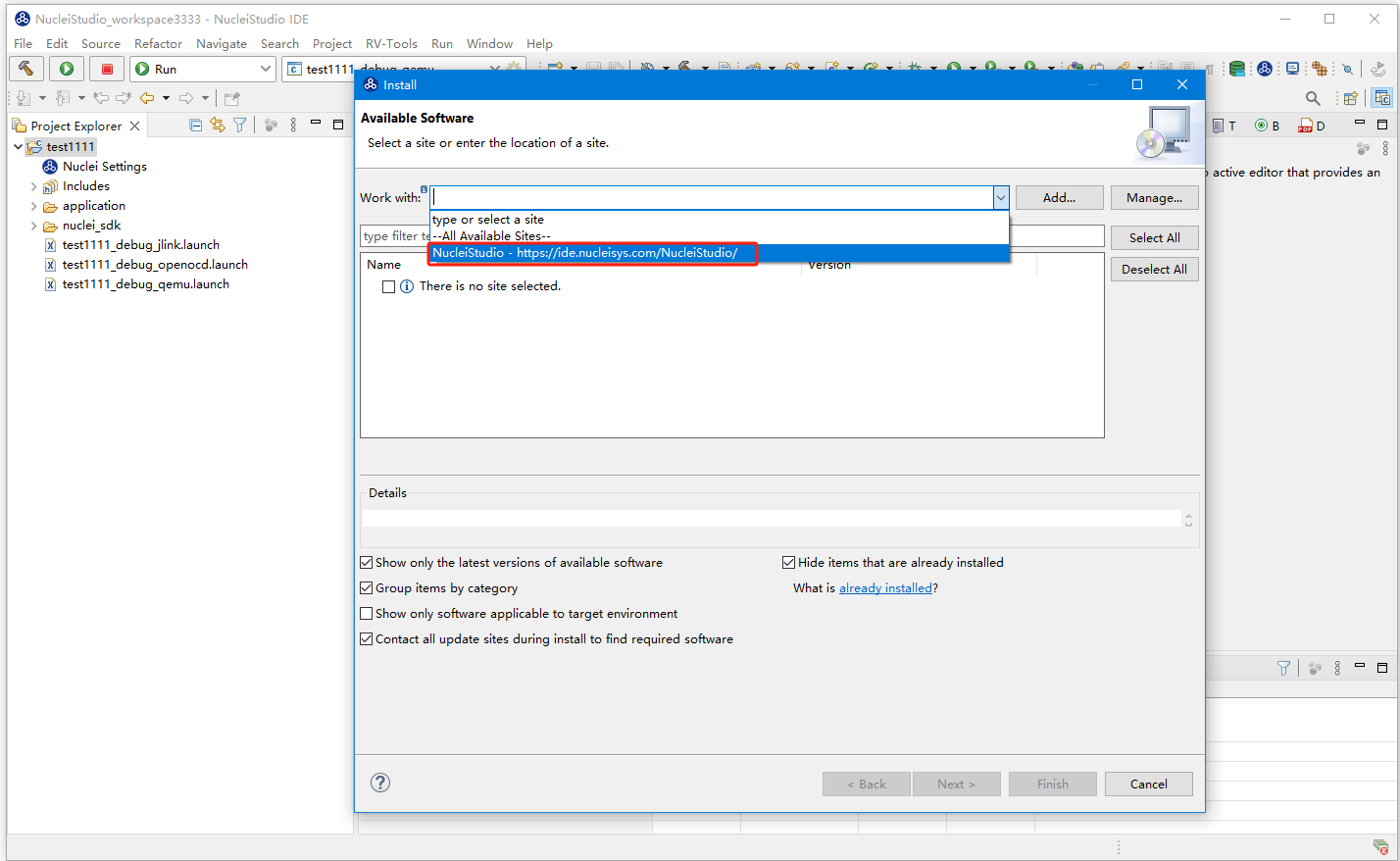
In the Nuclei Studio menu, go to Help->Install New Software, then in the Install dialog's Work with
field, select NucleiStudio - https://ide.nucleisys.com/NucleiStudio/. All plugins pending update will be listed below.
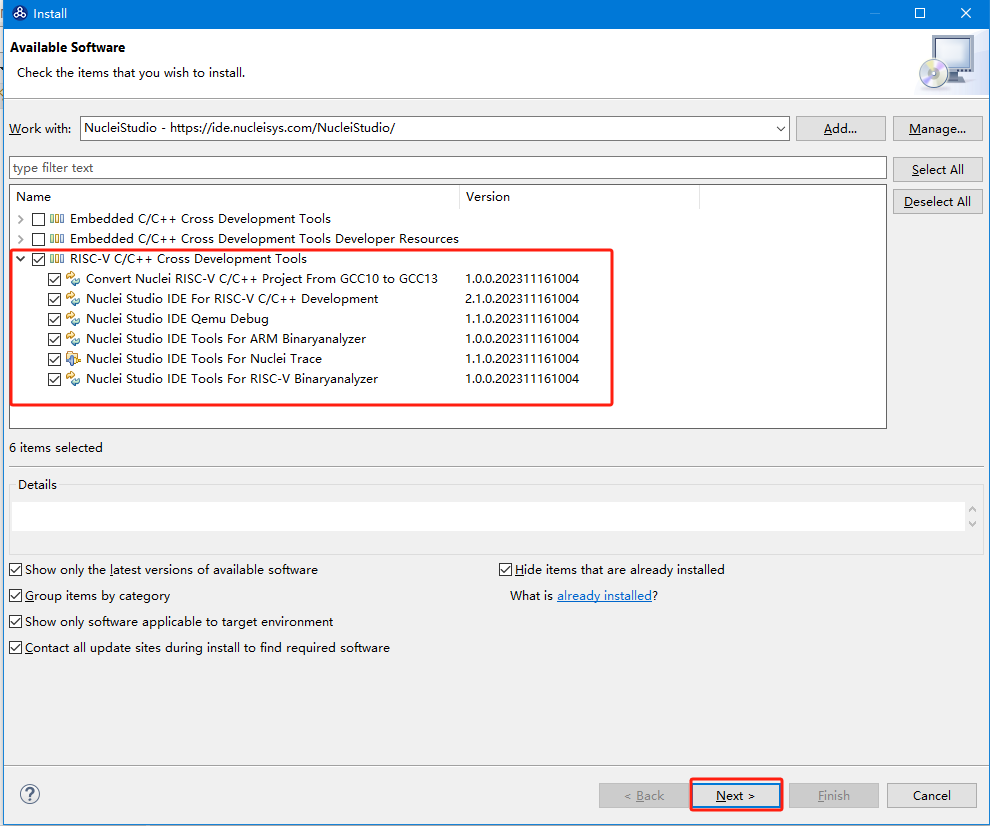
In the plugin list that pops up, select the plugins to upgrade. We select RISC-V C/C++ Cross Development Tools, then click Next.
During the upgrade, when Nuclei Studio asks about Trust Artifacts, proceed as shown in the figure below: select Trust Selected. Once the upgrade is complete, Nuclei Studio will restart. At this point, the Nuclei Studio Plugins upgrade is finished.

2. Upgrade build-tools
The Linux version does not require this step; you only need to make sure the
maketool is installed on your system.
Download build-tools-1.2 and replace the contents of NucleiStudio\toolchain\build-tools in Nuclei Studio 2023.10.
For details on this part, refer to Errors when using Pre-build Command/Post-build Command during project compilation.
With these two steps, the upgrade of Nuclei Studio 2023.10 is complete.
Downloading the Latest Version from the Official Website
If you do not want to perform a manual upgrade, you can download the latest Nuclei Studio 2023.10 directly from our website.