7.1. About Nuclei QEMU
Nuclei QEMU is developed based on QEMU version 9.0 and supports the machine features of Nuclei EvalSoC. In addition to the extensions supported by upstream QEMU, it supports the following unratified and custom extensions implemented by Nuclei.
Xxldsp: P 0.5.4 draft extension and Nuclei custom N1/N2/N3 extensions
Xxlcz: Nuclei custom code size reduction extension
Nice & Vnice: Nuclei custom Nice & Vnice extensions
Xxlvqmacc: Nuclei custom vpu extension
Zilsd & Zclsd: riscv-zilsd Release 1.0
Xxlfbf & Xxlvfbf: Nuclei custom scalar & vector BF16 extensions
Note
Before using Nuclei QEMU, you can check the current version on which Nuclei QEMU is based and the commit id through the --version option of Nuclei QEMU, for example:
$ qemu-system-riscv32 --version
QEMU emulator version 9.0.4 (v9.0.4-302-gd2e9c7c)
Copyright (c) 2003-2024 Fabrice Bellard and the QEMU Project developers
The above shows that Nuclei QEMU is currently developed based on the upstream version 9.0.4, and commit id is d2e9c7c.
The source code is available in the open-source Nuclei QEMU GitHub repository. For more information about QEMU, see the official QEMU documentation.
7.2. Design and Architecture
Previously, Nuclei QEMU supports two machine types: nuclei_evalsoc and nuclei_demosoc, but now, nuclei_demosoc has been abandoned on Nuclei QEMU 2025.02 and later versions.
7.2.1. Nuclei CPU Types Supported on QEMU
The following image shows the relevant information of the Nuclei CPU types supported by Nuclei QEMU.
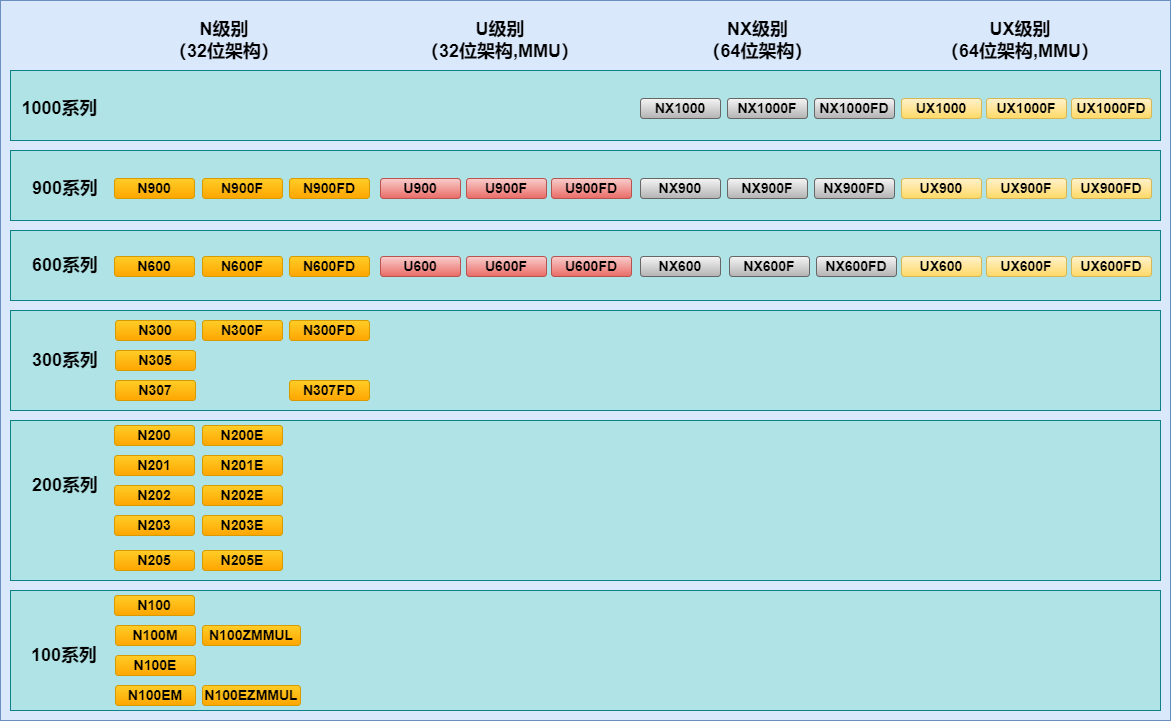
7.2.2. Address Allocation of EvalSoC on QEMU
The following table shows the default EvalSoC address map. Fixed devices can be relocated or disabled with soc-cfg. IREGION devices use fixed offsets from iregion.base, whose default value is 0x18000000.
Type |
Component |
Base address |
Size |
Description |
|---|---|---|---|---|
Memory |
XIP/NOR flash |
|
|
Boot flash and XIP memory. |
Memory |
QSPI0 XIP window |
|
|
Direct XIP window provided by QSPI0. |
Memory |
DDR |
|
|
General-purpose system memory. |
Memory |
ILM |
|
|
Instruction local memory. |
Memory |
DLM |
|
|
Data local memory. |
Memory |
SRAM |
|
|
On-chip SRAM address window. |
Fixed peripheral |
TEST |
|
|
EvalSoC test finisher and reset device. |
Fixed peripheral |
XEC0 |
|
|
Nuclei Ethernet controller. |
Fixed peripheral |
MISC |
|
|
Counters, NMI/event generation and miscellaneous controls. |
Fixed peripheral |
UART0 |
|
|
Legacy UART or USART serial controller. |
Fixed peripheral |
QSPI0 |
|
|
SPI/QSPI controller with an XIP window. |
Fixed peripheral |
uDMA |
|
|
Nuclei uDMA controller. |
Fixed peripheral |
QSPI1 |
|
|
Reserved configuration entry; the current board model realizes QSPI0 and QSPI2. |
Fixed peripheral |
QSPI2 |
|
|
SPI/QSPI controller. |
Fixed peripheral |
APLIC_M |
|
|
Machine-level advanced interrupt controller. |
Fixed peripheral |
APLIC_S |
|
|
Supervisor-level advanced interrupt controller. |
Fixed peripheral |
IMSIC_M |
|
|
Machine-level per-hart interrupt files; size is configurable. |
Fixed peripheral |
IMSIC_S |
|
Variable |
Supervisor-level per-hart interrupt files; each slot is |
IREGION |
IINFO |
|
|
CPU capability and implementation information registers. |
IREGION |
DEBUG |
|
|
Debug address space. |
IREGION |
ECLIC |
|
|
Nuclei ECLIC unit. |
IREGION |
TIMER |
|
|
Nuclei SysTimer/CLINT-compatible window. |
IREGION |
SMP/CC |
|
|
SMP and cluster-cache control unit. |
IREGION |
CIDU |
|
|
Core interrupt distribution unit. |
IREGION |
PLIC |
|
|
Platform-level interrupt controller. |
Information address |
PPI |
|
N/A |
Used to view CPU info, not implemented. |
Information address |
FIO |
|
N/A |
Used to view CPU info, not implemented. |
Note
The MROM reset trampoline at 0x1000 is no longer instantiated. EvalSoC now resets each hart directly to the selected download= start address.
7.2.3. Nuclei CPU and SoC Features Supported on QEMU
The following table summarizes the current implementation status.
Feature |
Status |
|---|---|
TIMER |
Supported; see TIMER Support. |
PLIC |
Supported; see PLIC Support. |
AIA |
Supported; see AIA Support. |
ECLIC v1/v2 |
Supported; see ECLIC Support. |
CIDU |
Supported; see CIDU Support. |
PMP |
Supported; see PMP Support. |
TEE |
Supported; see TEE Support. |
ECC |
ECC-related CSRs are implemented; see ECC Support. |
CCM |
CCM-related CSRs are implemented; see CCM Support. |
Nuclei stack check |
Supported; see STACK-CHECK Support. |
WFI / WFE |
Supported; see WFI/WFE Support. |
SPMP |
Not supported. |
SMP / CLUSTER CACHE |
Supported; see SMP & CLUSTER CACHE Support. |
UART / USART |
Supported; see UART Support. |
MISC |
Supported; see MISC Support. |
QSPI |
Supported; see QSPI Support. |
uDMA |
Supported; see uDMA Support. |
XEC Ethernet |
Supported; see XEC Ethernet Support. |
IREGION |
Supported; see IREGION Support. |
TEST FINISHER |
Supported; see TEST Support. |
7.2.3.1. TIMER Support
The Nuclei SysTimer implements a shared time base, per-hart timer comparison and delivery, timer pause/control behavior, and multi-core ECLIC operation. EvalSoC also provides a CLINT-compatible timer model for conventional RISC-V software and supports the Sstc supervisor timer extension.
7.2.3.2. PLIC Support
The PLIC model supports platform-level interrupt prioritization and routing for machine-mode and supervisor-mode interrupt contexts.
7.2.3.3. AIA Support
EvalSoC supports the RISC-V Advanced Interrupt Architecture in APLIC-only and APLIC-with-IMSIC forms, covering wired interrupt routing and message-signaled interrupt delivery. AIA operation is supported with both TCG and KVM.
7.2.3.4. ECLIC Support
ECLIC supports single-core and multi-core operation in both M-mode and S-mode. The ECLIC v1 model provides the basic interrupt configuration, arbitration, nesting and trigger behavior. ECLIC v2 additionally supports automatic context save/restore and shadow general-purpose register groups, together with the associated nested-trap state handling.
7.2.3.5. CIDU Support
The CIDU distributes external interrupts among per-hart ECLIC instances. It also implements inter-core interrupts, multiple interrupt-distribution modes, hardware semaphores, and supervisor-mode access control for multicore software.
7.2.3.6. PMP Support
QEMU provides the standard RISC-V PMP address-matching and memory-access permission behavior used by Nuclei CPUs.
7.2.3.7. TEE Support
QEMU’s Nuclei TEE-related support includes the sMPU v0.9.0 memory-protection model and S-mode ECLIC operation. These capabilities provide supervisor/user memory isolation, protection-fault reporting, and supervisor-level interrupt handling.
7.2.3.8. ECC Support
QEMU implements the Nuclei ECC-related CSR interfaces used by software. Hardware ECC generation, error detection and correction, and error injection are not functionally modeled.
7.2.3.9. CCM Support
QEMU implements the Nuclei CCM-related CSR interfaces used by software. The corresponding cache-control commands and cache hardware behavior are not functionally modeled.
7.2.3.10. WFI/WFE Support
Standard RISC-V WFI behavior is supported. Nuclei WFE support currently covers its architectural CSR interface, but does not model the complete hardware event and low-power behavior.
7.2.3.11. STACK-CHECK Support
The Nuclei stack-check model provides stack-bound tracking and detects stack overflow and underflow conditions, reporting them through the corresponding stack exception flow.
7.2.3.12. SMP & CLUSTER CACHE Support
The EvalSoC SMP/cluster block models the multicore control interface, the Snoop Control Unit (SCU) control surface, and cluster-local memory (CLM) instantiation. It does not model cache contents, coherence traffic, cache timing, or the functional behavior of the hardware cache hierarchy.
7.2.3.13. UART Support
EvalSoC supports the legacy Nuclei UART model and the newer USART v3.1.0 model. UART0 operates in the legacy UART mode by default. Compared with the legacy version, USART v3.1.0 adds transmit and receive FIFOs, programmable FIFO thresholds, receive-idle detection, baud timing, and expanded interrupt status handling. The current EvalSoC model instantiates UART0 only; UART1 is no longer present.
7.2.3.14. MISC Support
The MISC block provides programmable interrupt counters, NMI and event generation, latency/debug controls, SDIO control, and version reporting. Event and SDIO-control outputs are represented by the device, but are not connected to other devices on the current EvalSoC board.
7.2.3.15. QSPI Support
QSPI0 and QSPI2 support SPI/QSPI transfers and interrupt generation and operate in the legacy SPI v1.1.0 mode by default. QSPI0 additionally provides direct execute-in-place (XIP) access. Compared with SPI v1.1.0, SPI v1.2.8 adds expanded transfer control, status/error reporting and interrupt behavior, including QSPI0 uDMA transfers. QSPI1 is not instantiated by the current EvalSoC model.
7.2.3.16. uDMA Support
The uDMA v2.5.0 model supports memory-to-memory and peripheral transfers, single, continuous and repeat transfer modes, linked-list descriptors, and channel completion and error reporting. It is integrated with QSPI0 for transmit and receive data movement when QSPI0 operates in SPI v1.2.8 mode.
7.2.3.17. XEC Ethernet Support
XEC0 implements the Nuclei Ethernet MAC, PHY/MDIO access, descriptor-based transmit and receive DMA, packet filtering, status reporting, and interrupts. It integrates with standard QEMU network backends.
7.2.3.18. IREGION Support
The IINFO block primarily maps the selected CPU’s enabled ISA extensions into the corresponding IREGION capability information. Other IINFO registers are provided as register-interface examples. Because QEMU does not model the associated hardware structures, most of these registers expose only predefined values or simple storage and do not provide actual hardware-derived mappings or functional behavior.
7.2.3.19. TEST Support
The EvalSoC TEST finisher provides guest-to-host pass/fail reporting and a full-system reset request. Writing 0x3333 or 0x5555 to the TEST address (0x100000 by default) exits QEMU with a failure or pass result, respectively. Writing 0x7777 triggers a full-system reset, reinitializes all devices, and starts the program again.
7.3. Nuclei QEMU Command-line Options
This section covers EvalSoC-specific settings and commonly used QEMU options. For the full list of standard options, see the upstream QEMU invocation reference.
7.3.1. Command-line Syntax and Help
Use qemu-system-riscv32 for RV32 programs and qemu-system-riscv64 for RV64 programs, together with a CPU model matching the target architecture.
qemu-system-riscv32 -M nuclei_evalsoc[,property=value,...] \
  -cpu <model>[,property=value,...] [options]
Machine properties such as download and soc-cfg follow -M. CPU properties such as ext and vlen follow -cpu. Other options, such as -smp and -kernel, are separate command-line arguments.
Use the following commands to discover the options and models available in the installed build:
qemu-system-riscv32 --help
qemu-system-riscv32 -machine help
qemu-system-riscv32 -M nuclei_evalsoc,help
qemu-system-riscv32 -cpu help
qemu-system-riscv32 -d help
7.3.2. EvalSoC Machine Configuration
-M nuclei_evalsoc[,property=value,...]: Selects the EvalSoC machine and sets its properties.
download=flashxip/flash/ilm/sram/ddr: Selects the download mode; the default is flashxip. See Boot and Image Loading for its relationship with image loading and startup addresses.
aia=none/aplic/aplic-imsic: Selects the external interrupt controller: PLIC, APLIC or APLIC with IMSIC, respectively. The default is none.
aia-guests=0..4: Sets the number of guest interrupt contexts for AIA-IMSIC. The S-level IMSIC window allocates one 0x1000 page for the supervisor context and each guest context, rounding the per-hart allocation up to a power-of-two number of pages. Its size therefore varies with aia-guests.
cidu=on/off: Enables or disables CIDU; it is enabled by default. iregion.cidu=0 in soc-cfg also disables it, even if cidu=on is supplied.
soc-cfg=<file.json>: Overrides the built-in board configuration. The JSON format and supported fields are described below.
debug=1: Prints the configured memory layout, peripheral addresses and interrupt information at startup. Use it to inspect the effective board configuration.
7.3.2.1. soc-cfg JSON Configuration
Pass the configuration file as a machine property, for example -M nuclei_evalsoc,download=ilm,soc-cfg=soc.json. Without soc-cfg, QEMU uses the built-in default layout.
Note
The current implementation recognizes two top-level JSON objects: general_config and download. Partial overrides and arbitrary key order are supported; omitted or empty fields keep their defaults. Write numeric leaf values as strings. Decimal and 0x-prefixed hexadecimal values are accepted, together with M/G suffixes for sizes.
The following example overrides memory regions, selected peripherals and download-mode startup addresses:
{
    "general_config": {
        "ddr": {
            "base": "0x70000000",
            "size": "2G"
        },
        "ilm": {
            "base": "0x90000000",
            "size": "0x100000"
        },
        "dlm": {
            "base": "0xA0000000",
            "size": "0x100000"
        },
        "sram": {
            "base": "0xB0000000",
            "size": "0x10000000"
        },
        "norflash": {
            "base": "0x30000000",
            "size": "32M"
        },
        "iregion": {
            "base": "0x18000000",
            "eclic": "1",
            "cidu": "1",
            "plic": "1",
            "clicintctlbits": "4"
        },
        "uart0": {
            "base": "0x20013000",
            "size": "0x1000",
            "irq": "1",
            "version": "0x00030100"
        },
        "qspi0": {
            "base": "0x20014000",
            "irq": "3",
            "version": "0x00010208",
            "xip_base": "0x34000000",
            "xip_size": "64M"
        },
        "qspi2": {
            "base": "0x20034000",
            "irq": "5",
            "enable": "0"
        },
        "udma": {
            "base": "0x10015000",
            "size": "0x1000",
            "enable": "1"
        },
        "misc": {
            "base": "0x10012000",
            "size": "0x1000",
            "counter0_irq": "6",
            "counter1_irq": "7"
        },
        "xec0": {
            "base": "0x20002000",
            "irq": "8",
            "enable": "0"
        },
        "timer_freq": "32768",
        "irqmax": "1024"
    },
    "download": {
        "ilm": {
            "startaddr": "0x90000000"
        },
        "flashxip": {
            "startaddr": "0x30000000"
        },
        "flash": {
            "startaddr": "0x30000000"
        },
        "sram": {
            "startaddr": "0xB0000000"
        },
        "ddr": {
            "startaddr": "0x70000000"
        }
    }
}
The soc-cfg JSON file contains the general_config and download top-level objects. The table below lists each supported field, the objects that accept it, and its purpose. Object names without a prefix belong to general_config; download-mode objects are shown with their full download.* paths.
Field |
Applies to objects |
Description |
|---|---|---|
|
|
Sets the base address of the corresponding memory or MMIO region. |
|
|
Sets the region size or per-hart stride where applicable. Some sizes are recomputed by QEMU. |
|
|
Sets the peripheral’s PLIC/APLIC source ID; routed to ECLIC/CIDU according to the board mapping below. |
|
|
Set the MISC Counter0 and Counter1 PLIC/APLIC source IDs, respectively. |
|
|
Enables or disables the corresponding device or address block. |
|
|
Selects a modeled peripheral revision where supported. |
|
|
Configures the QSPI0 XIP window. |
|
|
Accepted by the parser; it does not independently remove the fixed DEBUG subwindow. |
|
|
Enable or disable the corresponding IREGION block. |
|
|
Sets ECLIC |
|
|
Sets the SysTimer clock frequency. |
|
|
Sets the CPU/MISC countdown clock frequency. |
|
|
Sets the external interrupt-ID limit shared by ECLIC, PLIC and APLIC. |
|
|
Sets the firmware entry address for the corresponding download mode. |
irqmaxDefines the number of interrupt IDs visible to ECLIC, PLIC and APLIC. The default is
1024and the accepted range is40through1024. The minimum covers the built-in layout, whose highest PLIC/APLIC source ID is 39. The visible range is therefore0throughirqmax - 1. PLIC/APLIC source 0 is reserved, so their usable source IDs are1throughirqmax - 1.Note
UART0, uDMA, QSPI0/1/2 and the two MISC counters use the EvalSoC dual-line routing convention. XEC0 is a single-line source.
Without an explicit IRQ override, each dual-line source is routed to both its small and large IDs, separated by 32.
If a dual-line source has an explicit
soc-cfgIRQ value, that source is routed only to the configured ID.Once any enabled dual-line source has an explicit IRQ value, every other dual-line source without an override is routed only to its large ID.
The following table shows the built-in allocation when no IRQ values are overridden:
IRQ_ID
ECLIC Interrupt ID
PLIC Interrupt ID
APLIC Interrupt ID
Source
0 & 32
19 & 51
1 & 33
1 & 33
UART0
1 & 33
20 & 52
2 & 34
2 & 34
uDMA
2 & 34
21 & 53
3 & 35
3 & 35
QSPI0
3 & 35
22 & 54
4 & 36
4 & 36
QSPI1
4 & 36
23 & 55
5 & 37
5 & 37
QSPI2
5 & 37
24 & 56
6 & 38
6 & 38
MISC Counter0
6 & 38
25 & 57
7 & 39
7 & 39
MISC Counter1
7
26
8
8
XEC0 Ethernet
n
n + 19
n + 1
n + 1
download.<mode>.startaddr: Defines a startup-address override for each download mode. The JSON file can contain overrides for multiple modes; the machine-level download= option selects which one is used for the current run. These fields do not change the corresponding memory-region mappings.
For example, the following partial configuration maps ILM at 0x90000000 and SRAM at 0xB0000000, while assigning a separate startup address to each mode:
{
    "general_config": {
        "ilm": {
            "base": "0x90000000",
            "size": "0x100000"
        },
        "sram": {
            "base": "0xB0000000",
            "size": "0x10000000"
        }
    },
    "download": {
        "ilm": {
            "startaddr": "0x90001000"
        },
        "sram": {
            "startaddr": "0xB0002000"
        }
    }
}
With this file, the selected mode determines which override is active:
# Uses 0x90001000; the ILM mapping still begins at 0x90000000.
qemu-system-riscv32 -M nuclei_evalsoc,download=ilm,soc-cfg=soc.json ...

# Uses 0xB0002000; the SRAM mapping still begins at 0xB0000000.
qemu-system-riscv32 -M nuclei_evalsoc,download=sram,soc-cfg=soc.json ...
For ILM, SRAM and flash XIP, omitting the selected mode’s startaddr uses the corresponding region’s base. flash inherits the flash XIP startup address unless overridden. For ddr, an explicitly configured DDR base is also the default startup address; otherwise, the historical startup address 0xA0000000 is retained.
7.3.3. CPU Configuration
-cpu <model>[,property=value,...]: Selects the CPU model and its properties. Use -cpu help to list available models, or refer to the CPU model diagram.
ext=<extension_list>: Enables additional ISA extensions, separated by _. For example, ext=_v_xxldsp enables the RISC-V vector and Nuclei DSP extensions. See Supported ISA Extensions for the available extensions.
vlen=<bits>: Sets vector-register width when vector extensions are enabled. The default is 128 bits; values must be powers of two from 128 through 1024.
elen=<bits>: Sets the maximum vector element width; values must be powers of two from 8 through 64. The default is 32 when only Zve32* extensions are enabled, and 64 otherwise. An explicit value overrides this default.
s=true/false: Enables or disables supervisor privilege mode. Supervisor support includes S-mode ECLIC and Sstc when the corresponding features are enabled.
big-endian=auto/on/off: auto (the default) detects endianness from the boot ELF on EvalSoC; on forces big-endian and off forces little-endian, overriding ELF detection.
7.3.3.1. Supported ISA Extensions
The following extensions can be selected through ext=. Choose extensions supported by the selected CPU configuration and the guest program.
Extension |
Functionality |
|---|---|
v |
RISC-V V-Extension |
h |
RISC-V H-Extension |
zicbom |
RISC-V Zicbom Extension |
zicboz |
RISC-V Zicboz Extension |
zicond |
RISC-V Zicond Extension |
zibi |
RISC-V Zibi Extension |
zimop |
RISC-V Zimop Extension |
zcmop |
RISC-V Zcmop Extension |
zicfilp |
RISC-V Zicfilp Extension |
zicfiss |
RISC-V Zicfiss Extension |
zicsr |
RV32/RV64 Zicsr Standard Extension |
zifencei |
RV32/RV64 Zifencei Standard Extension |
zihintpause |
Zihintpause Extension |
zilsd |
Zilsd extension (RV32 ONLY) |
zclsd |
Zclsd extension (RV32 ONLY) |
zawrs |
Zawrs extension |
zfh |
Zfh Extension |
zfa |
Zfa Extension |
zfhmin |
Zfhmin Extension |
zfinx |
Zfinx Extension |
zdinx |
Zdinx Extension |
zca |
RISC-V Zc* Extension |
zcb |
RISC-V Zc* Extension |
zcf |
RISC-V Zc* Extension |
zcd |
RISC-V Zc* Extension |
zce |
RISC-V Zc* Extension |
zcmp |
RISC-V Zc* Extension |
zcmt |
RISC-V Zc* Extension |
zba |
RISC-V Bitmanipulation Extension |
zbb |
RISC-V Bitmanipulation Extension |
zbc |
RISC-V Bitmanipulation Extension |
zbkb |
RISC-V Bitmanipulation Extension |
zbkc |
RISC-V Bitmanipulation Extension |
zbkx |
RISC-V Bitmanipulation Extension |
zbs |
RISC-V Bitmanipulation Extension |
zk |
RISC-V Scalar Crypto Extension |
zkn |
RISC-V Scalar Crypto Extension |
zknd |
RISC-V Scalar Crypto Extension |
zkne |
RISC-V Scalar Crypto Extension |
zknh |
RISC-V Scalar Crypto Extension |
zkr |
RISC-V Scalar Crypto Extension |
zks |
RISC-V Scalar Crypto Extension |
zksed |
RISC-V Scalar Crypto Extension |
zksh |
RISC-V Scalar Crypto Extension |
zkt |
RISC-V Scalar Crypto Extension |
zve32x |
RISC-V V-Extension |
zve32f |
RISC-V V-Extension |
zve64x |
RISC-V V-Extension |
zve64f |
RISC-V V-Extension |
zve64d |
RISC-V V-Extension |
zvfh |
RISC-V V-Extension |
zvfhmin |
RISC-V V-Extension |
zhinx |
Zhinx Extension |
zhinxmin |
Zhinxmin Extension |
smaia |
Smaia Extension |
smrnmi |
Smrnmi Extension |
smdbltrp |
Machine-mode double-trap handling |
ssdbltrp |
Supervisor-mode double-trap handling |
smcntrpmf |
Smcntrpmf Extension |
ssaia |
Ssaia Extension |
sscofpmf |
Sscofpmf Extension |
sstc |
Sstc Extension |
svadu |
Svadu Extension |
svinval |
Svinval Extension |
svnapot |
Svnapot Extension |
svpbmt |
Svpbmt Extension |
xxldsp |
Nuclei DSP Extension based on P-ext 0.5.4 + default 8 EXPD instructions |
xxldspn1x |
Xxldsp + Nuclei N1 extension |
xxldspn2x |
Xxldspn1x + Nuclei N2 extension |
xxldspn3x |
Xxldspn2x + Nuclei N3 extension |
xxlcz |
Nuclei code size reduction extension |
xxlvqmacc |
Nuclei custom vpu extension |
xxlfbf |
Nuclei scalar BF16 extension |
xxlvfbf |
Nuclei vector BF16 extension |
7.3.4. Memory and CPU Count
-m <size>: Sets the DDR size, for example -m 2G. Without an override, QEMU uses the DDR size from soc-cfg, or the built-in default of 64 MiB.
Note
EvalSoC retains a compatibility rule: omitting -m or passing -m 128M keeps the DDR size from soc-cfg or the board default. To request exactly 128 MiB, set general_config.ddr.size to "128M" in the JSON file and omit -m. Large memory configurations also require sufficient host memory.
-smp <count>: Sets the number of harts. EvalSoC supports 1 through 64 harts and defaults to 1. The guest program must support the selected hart count.
7.3.5. Boot and Image Loading
-kernel <file> or -bios <file>: Selects the image to load. The choice is independent of the interrupt architecture; PLIC or ECLIC configuration no longer determines which option must be used.
The download machine property selects the startup region, and download.<mode>.startaddr in soc-cfg overrides its startup address. Match these settings and the memory layout to the guest image. See soc-cfg JSON Configuration for configuration examples.
The following options apply to direct kernel boot. When using a bootloader such as the Nuclei Linux SDK freeloader, follow that bootloader’s image and device-tree conventions instead:
-append "<command line>": Sets the kernel command line in the generated device tree.
-initrd <file>: Loads an initial RAM disk when QEMU loads the kernel through -kernel.
-dtb <file>: Supplies a device tree in place of the one generated by EvalSoC. Its CPU, memory and peripheral descriptions must match the configured machine.
7.3.6. Console and Character Devices
-nographic: Disables graphical output and redirects the default serial console and QEMU monitor to the terminal. With the default multiplexed console, Ctrl-a h displays help and Ctrl-a c switches between the serial console and monitor.
-display none: Disables graphical output without changing serial or monitor routing.
-serial stdio: Connects UART0 to the host terminal. Use -serial mon:stdio to share that terminal with the QEMU monitor, or -serial none to disconnect the serial backend.
-monitor none: Disables the QEMU monitor. Use -monitor stdio for a dedicated monitor terminal when serial output uses another backend.
-chardev <backend>,id=<id>,...: Defines a character backend that can be connected with -serial chardev:<id>. For example, replace the terminal options in a command with the following to record UART0 output in a file:
-display none -monitor none \
-chardev file,id=uart0,path=uart.log -serial chardev:uart0
-nodefaults: Suppresses automatically created default devices and backends. Fixed EvalSoC peripherals remain present; explicitly select the serial, monitor and other backends needed by the guest.
7.3.7. Storage
-drive file=<image>,if=sd,format=raw: Attaches a raw SD-card image to the card connected to QSPI2. This is the filesystem disk used by the Linux SDK example.
Keep the corresponding QSPI controller enabled in soc-cfg. Disk and flash images are writable by default; add readonly=on to a drive for read-only access, or use -snapshot for temporary writes that are discarded on exit.
7.3.8. Networking
-nic user,model=nuclei.xec: Configures QEMU’s user-mode network backend and connects it to the Nuclei XEC device. QEMU also supports other network backends; see the XEC Ethernet usage guide for usage examples and TAP setup.
7.3.9. Plugins
-plugin <file>[,arg=value,...]: Loads a QEMU plugin. For the Nuclei NICE/VNICE plugin, pass the plugin file and user instruction library with -plugin <plugin-file>,lib=<user-library>. See the NICE/VNICE plugin guide for build instructions and a complete example.
7.3.10. Execution and Timing
-accel tcg: Selects software emulation. TCG supports the bare-metal examples in this guide. For SMP execution, -accel tcg,thread=multi requests multi-threaded TCG; use it without -icount.
-icount shift=0: Derives virtual time from executed instructions, with one instruction corresponding to one nanosecond at shift=0. This controls virtual timing rather than modelling hardware cycle counts. icount is incompatible with multi-threaded TCG, so it is not recommended when running SMP programs: omit -icount to allow the vCPUs to run on separate TCG threads. Use it with SMP only when instruction-based virtual time or deterministic execution is specifically required. See TCG instruction counting for additional settings.
7.3.11. Debugging
-S: Pauses the CPUs at startup until a debugger or monitor resumes execution.
-s: Starts the GDB server on TCP port 1234. It is shorthand for -gdb tcp::1234; combine it with -S to debug from the first instruction. In GDB, connect with target remote localhost:1234 and start execution with continue.
-gdb <endpoint>: Selects another GDB endpoint, for example -gdb tcp::3333. See the upstream GDB usage guide for debugging details.
-d <items>: Enables diagnostic logging. Run -d help to list supported items; for example, -d guest_errors,unimp reports guest errors and unimplemented accesses.
-D <file>: Writes diagnostic logs to the specified file, for example -d guest_errors,unimp -D qemu.log. These logs are separate from UART output.
Note
Before using GDB or diagnostic logs for in-depth debugging, first check that the command-line options and guest image match: verify the QEMU/CPU architecture, ELF entry and load addresses, selected download mode, and memory settings. If soc-cfg is used, add debug=1 to the -M nuclei_evalsoc properties to inspect the effective memory regions and peripheral layout, then compare them with the guest linker script, device tree and driver configuration. Rerun QEMU with debug=1 after changing soc-cfg to confirm the resulting configuration.
7.4. Use Nuclei QEMU in Nuclei SDK
Setup Tools and Environment
Download the nuclei-sdk, checkout to
masterbranch.Download RISC-V GNU Toolchain form Nuclei Download Center.
Download Nuclei Qemu form Nuclei Download Center.
Set up the system environment variables to ensure that the directories containing
riscv64-unknown-elf-gccandqemu-system-riscv32are included in the global system variable environment.
Example
If you want to use QEMU on Nuclei-SDK. The example here uses the CPU of the nx900fd, but other CPU types can also be used for testing. The example is xxldsp.
First, you need to configure the toolchain, nuclei-sdk, and qemu environments according to the documentation https://doc.nucleisys.com/nuclei_sdk/quickstart.html
# Enter the example folder of xxldsp
cd nuclei-sdk/application/baremetal/demo_dsp/
# Clear the compilation cache
make clean
# Compile the program for the nx900fd, set the download mode to ILM, and enable the xxldsp extension
make CORE=nx900fd SOC=evalsoc DOWNLOAD=ilm ARCH_EXT=_xxldsp dasm
# Automatically generate qemu running commands and execute the program
make CORE=nx900fd SOC=evalsoc DOWNLOAD=ilm ARCH_EXT=_xxldsp run_qemu
Where ARCH_EXT can be used to pass the extension name.
Under normal circumstances, you should see the final output NMSIS_TEST_PASS, which indicates that all test cases have passed successfully.
Support for Nuclei SDK Cases on QEMU
Y- Successfully run and consistent with hardware
N- Successfully run but inconsistent with hardware
F- Failed
Cases |
SMP=1 |
SMP>1 |
Description (additional compilation parameters and running status) |
|---|---|---|---|
benchmark/coremark |
Y |
||
benchmark/dhrystone |
Y |
||
benchmark/ dhrystone_v2.2 |
Y |
||
benchmark/whetstone |
Y |
||
benchmark/ whetstone_v1.2 |
Y |
||
cpuinfo/ |
Y |
||
demo_backtrace/ |
Y |
||
demo_cache/ |
F |
QEMU does not support cache emulation. |
|
demo_cidu/ |
Y |
SMP=4, XLCFG_CIDU=1, ICOUNT_OPT=””. ECLIC v2: XLCFG_ECLIC=2, ECLIC_HWCTX=0/1. |
|
demo_clint_timer/ |
Y |
||
demo_dsp/ |
Y |
||
demo_ecc/ |
N |
ECC error injection and correction behavior is not modeled. |
|
demo_eclic/ |
Y |
||
demo_eclic_stress/ |
Y |
XLCFG_SMODE=0/1, XLCFG_SSTC=0/1; ECLIC v2 uses XLCFG_ECLIC=2 and ECLIC_HWCTX=0/1. |
|
demo_eclic_umode/ |
Y |
XLCFG_SMPU=1; ECLIC v2 uses XLCFG_ECLIC=2 and ECLIC_HWCTX=0/1. |
|
demo_nice/ |
Y |
||
demo_plic/ |
Y |
Y |
XLCFG_PLIC=1. |
demo_pma/ |
Y |
XLCFG_CCM=1, XLCFG_HPM=1. |
|
demo_pmp/ |
Y |
XLCFG_SMODE=0 for M-mode-only; ECLIC v2 uses XLCFG_ECLIC=2 and ECLIC_HWCTX=0/1. |
|
demo_profiling/ |
Y |
DOWNLOAD=sram. |
|
demo_smode_clint/ |
Y |
||
demo_smode_eclic/ |
Y |
XLCFG_SMODE=1; ECLIC v2 uses XLCFG_ECLIC=2 and ECLIC_HWCTX=0/1. |
|
demo_smode_plic/ |
Y |
XLCFG_PLIC=1. |
|
demo_smpcc/ |
N |
Control registers are modeled; cluster-cache behavior is not modeled. |
|
demo_smpu/ |
Y |
XLCFG_SMPU=1, CHK_MODE=0 through 5. |
|
demo_sstc/ |
Y |
||
demo_stack_check/ |
Y |
||
demo_timer/ |
Y |
||
demo_vnice/ |
Y |
||
empty/ |
Y |
||
exception_mmode/ |
Y |
||
exception_smode/ |
Y |
XLCFG_SMODE=1. |
|
exception_umode/ |
Y |
XLCFG_SMODE=1, XLCFG_SMPU=1. |
|
helloworld/ |
Y |
||
lowpower/ |
Y |
||
smphello/ |
Y |
SMP=4, ICOUNT_OPT=””. |
|
freertos/demo/ |
Y |
||
freertos/smpdemo/ |
Y |
SMP=4, ICOUNT_OPT=””. |
|
rtthread/demo/ |
Y |
||
rtthread/demo_smode/ |
Y |
XLCFG_SMODE=1, XLCFG_SSTC=1. |
|
rtthread/msh/ |
Y |
||
threadx/demo/ |
Y |
||
threadx/smpdemo/ |
Y |
SMP=4, ICOUNT_OPT=””. |
|
ucosii/demo/ |
Y |
And Nuclei QEMU and Nuclei SDK are deeply integrated in Nuclei Studio, you can also use it in Nuclei Studio, see Nuclei Studio IDE.
7.5. Use Nuclei QEMU in Nuclei Linux SDK
Nuclei QEMU can also used to boot and test RISC-V Linux Kernel using emulated Nuclei EvalSoC, please check documentation here https://github.com/Nuclei-Software/nuclei-linux-sdk#booting-linux-on-nuclei-qemu .
An example of a typical Nuclei QEMU running Nuclei Linux SDK is as follows:
qemu-system-riscv64 -M nuclei_evalsoc,download=flashxip,soc-cfg=soc.json -cpu nuclei-ux900fd,ext= -smp 8 -m 2G -bios freeloader_qemu.elf -nographic -drive file=disk.img,if=sd,format=raw
Use soc.json, freeloader_qemu.elf and disk.img from the same Linux SDK configuration. The JSON supplies the board layout, the freeloader handles the SDK boot flow, and the disk image provides the SD-card contents through QSPI2. Match the CPU features, hart count and DDR size to the SDK build.
For individual options, see soc-cfg configuration, CPU Configuration, Memory and CPU Count and Storage.